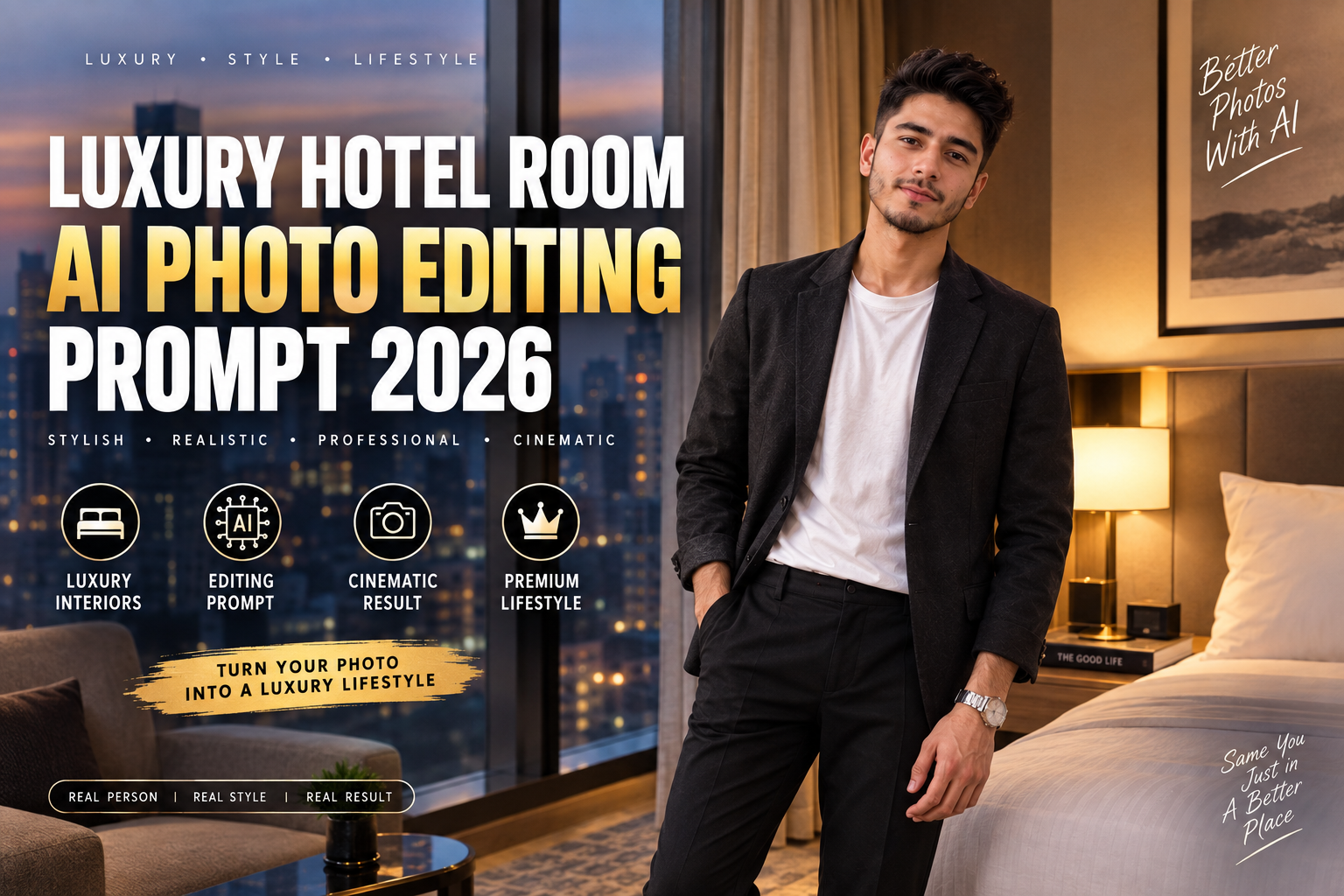
Creating a professional-looking portrait does not always require a studio, expensive camera, or luxury location. With modern AI photo editing tools, you can transform an ordinary photo into a premium lifestyle portrait by changing the environment, outfit, lighting, pose, and overall photography style.
One of the most popular aesthetics for social media is the Luxury Hotel Room AI Photo Editing Prompt. It combines elegant interiors, soft lighting, stylish clothing, realistic skin texture, and cinematic photography to create a high-end lifestyle appearance.
In this guide, you will find a detailed AI photo editing prompt, negative prompt, variations, editing tips, and frequently asked questions.
What Is a Luxury Hotel Room AI Photo Editing Prompt?
A Luxury Hotel Room AI Photo Editing Prompt is a detailed instruction that tells an AI image editor how to transform an existing portrait into a realistic luxury hotel photograph.
Instead of simply applying a filter, the AI can modify different visual elements such as:
- Hotel room interior
- Outfit
- Lighting
- Pose
- Background
- Camera perspective
- Shadows
- Reflections
- Color grading
- Skin texture
- Hair details
The main goal is to create a photograph that looks naturally captured inside a premium hotel rather than an obviously AI-generated image.
Luxury Hotel Room AI Photo Editing Prompt
Copy the prompt below and use it with a compatible AI image editing tool.
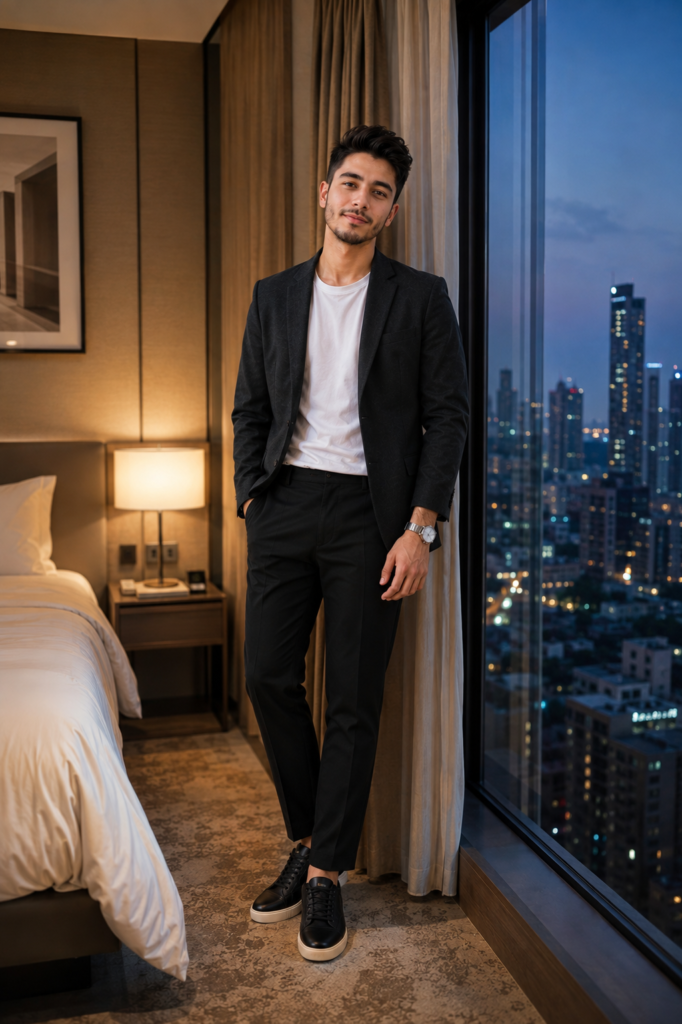
Transform my uploaded photo into a sophisticated luxury hotel lifestyle portrait while preserving my recognizable face, facial structure, hairstyle, natural skin tone, body proportions, and overall identity.

Place me standing casually inside a beautifully designed modern luxury hotel room during the early evening. The room should feature elegant warm-neutral interiors, a large floor-to-ceiling window, premium curtains, a comfortable upholstered bed, a minimalist bedside table, a modern lamp, subtle wall artwork, and refined architectural details.

Keep the interior luxurious but realistic. Avoid excessive decoration and make the room feel like an authentic high-end hotel rather than an unrealistic fantasy environment.

Dress me in a sophisticated dark charcoal blazer over a clean plain white T-shirt, paired with tailored black trousers and minimalist leather sneakers. Add a simple silver wristwatch and very subtle accessories. Keep the styling modern, masculine, elegant, and understated.

Give me a relaxed standing pose near the window. Keep one hand casually inside my trouser pocket while the other rests naturally beside my body. Keep my shoulders relaxed and my posture confident but effortless.

Maintain a calm natural facial expression with a subtle confident smile. Do not dramatically change my facial expression, facial structure, hairstyle, or recognizable features.

Use soft warm hotel lighting combined with gentle natural evening light entering through the large window. Create realistic highlights on my face, hair, blazer, and clothing while maintaining natural shadows underneath the chin, arms, clothing folds, and around the furniture.

Outside the window, show a softly blurred modern city skyline during blue hour. Include distant buildings, subtle city lights, and a slightly hazy evening atmosphere. Keep the exterior background realistic and understated.

Use realistic reflections on the window glass and subtle reflections on polished surfaces inside the room. Ensure that all reflections follow the correct lighting direction and perspective.

Use a professional 50mm portrait photography perspective with realistic depth of field. Keep my face, eyes, hair strands, hands, and clothing sharply detailed while allowing the distant room elements and city lights to have gentle cinematic softness.

Preserve natural skin texture, realistic pores, individual hair strands, authentic fabric details, believable clothing folds, accurate hands, natural body proportions, and physically consistent shadows.

Use a sophisticated color palette consisting of charcoal, cream, warm beige, soft brown, muted gold, and subtle blue-grey tones from the evening window.

Apply subtle cinematic color grading with controlled contrast, natural skin tones, soft highlights, and gentle shadow detail. Avoid excessive HDR, oversaturation, or artificial glow.

Add very subtle professional photography grain and realistic lens depth without making the photograph look heavily filtered.

The final result should look like a genuine high-end hotel lifestyle photograph captured with a professional modern camera.

Do not change my identity or facial characteristics. Do not make my face look artificial, overly smooth, excessively handsome, or digitally generated. Preserve my natural appearance while realistically changing the environment, outfit, lighting, and photography style.
Negative Prompt
If your AI editor supports a negative prompt, use the following:
distorted face, changed identity, different person, unrealistic facial structure, plastic skin, excessive skin smoothing, beauty filter, artificial eyes, unnatural smile, distorted hair, deformed hands, extra fingers, missing fingers, duplicated limbs, unnatural body proportions, exaggerated muscles, warped clothing, floating accessories, distorted hotel room, duplicate furniture, duplicate person, unrealistic window reflection, incorrect reflections, distorted city skyline, warped bed, deformed lamp, unrealistic shadows, fake lighting, excessive HDR, oversaturated colors, cartoon, anime, illustration, blurry face, low resolution, excessive sharpening, fake skin texture, bad perspective, messy composition, unrealistic depth of field, artificial background, unnatural body pose
How to Get the Best Luxury Hotel Portrait
A good Luxury Hotel Room AI Photo Editing Prompt should describe more than just the hotel. Lighting, camera perspective, clothing, shadows, and facial preservation are equally important.
1. Start With a Clear Original Photo
Use a photo where your face and hairstyle are clearly visible. A sharp source image gives the AI more facial information and can help maintain recognizable features.
Avoid heavily filtered or extremely blurry photos when possible.
2. Use Warm Interior Lighting
Luxury hotels commonly use warm ambient lighting. Combining warm lamps with cooler blue-hour light from the window creates a natural cinematic contrast.
This makes the photograph look more dimensional than using a single flat light source.
3. Keep the Interior Realistic
Adding too many luxury objects can make the result look artificial. A premium bed, bedside table, lamp, curtains, artwork, and large window are usually enough.
The room should look expensive without becoming visually crowded.
4. Use a Simple Outfit
A blazer, plain T-shirt, tailored trousers, sneakers, and a watch can create a sophisticated lifestyle appearance.
You don’t need excessive jewelry or designer logos to make the photograph look premium.
5. Preserve Natural Skin Texture
Avoid asking the AI to create completely flawless skin. Natural skin texture, subtle facial details, and individual hair strands can make the final result considerably more realistic.
Luxury Hotel Room AI Prompt Variations
The main prompt can be customized for different aesthetics.
Luxury Hotel Balcony Portrait
Replace the room location with:
Place me standing on a private luxury hotel balcony overlooking a modern city skyline during blue hour. Include a glass railing, elegant outdoor furniture, subtle warm balcony lighting, and realistic distant city lights.
Morning Hotel Portrait
For a brighter lifestyle photograph:
Set the scene during early morning with soft natural sunlight entering through large hotel windows. Use bright cream and beige interiors, gentle shadows, fresh daylight, and a clean premium lifestyle atmosphere.
Night Hotel Portrait
For a darker cinematic style:
Set the scene late at night with warm bedside lamps, subtle city lights visible through the window, dark neutral interiors, and soft reflections on the glass. Keep the subject naturally illuminated.
Luxury Hotel Bathroom Portrait
For a different fashion aesthetic:
Place me inside a sophisticated modern hotel bathroom featuring large neutral stone surfaces, a wide mirror, warm indirect lighting, minimalist fixtures, and subtle reflections. Keep the environment clean and realistic.
Luxury Hotel Mirror Selfie Variation
You can also turn the concept into a mirror selfie:
Place me casually in front of a large full-length mirror inside a modern luxury hotel room. I am holding a smartphone naturally in one hand, partially covering a portion of my face as in an authentic mirror selfie.

Keep the mirror reflection physically accurate, including realistic smartphone reflections, natural lighting, correct body proportions, and consistent clothing details.

Use warm hotel lighting combined with soft city light entering through the window. Keep the room elegant, minimal, and slightly dim while maintaining clear visibility of the subject.
Camera Settings for a More Realistic Look
If your AI image editor accepts photography instructions, adding camera details can help establish a consistent visual style.
For this concept, try:
| Photography Element | Recommended Style |
|---|---|
| Lens | 50mm |
| Perspective | Natural portrait |
| Depth of field | Moderate |
| Lighting | Warm ambient + window light |
| Composition | Full or three-quarter body |
| Focus | Face and upper body |
| Background | Soft cinematic blur |
| Color | Warm neutral |
| Finish | Subtle film grain |
These details are not mandatory, but they can help guide the overall photography aesthetic.
Best Color Palette for a Luxury Hotel Portrait
A premium hotel portrait usually works well with a restrained color palette.
Recommended colors include:
- Charcoal
- Warm beige
- Cream
- Soft brown
- Muted gold
- Dark grey
- Blue-grey
Avoid excessive neon colors unless you specifically want a nightclub or futuristic hotel aesthetic.
A controlled palette makes the final image feel more like professional editorial photography.
Common AI Editing Problems and How to Fix Them
Face Looks Different
Add stronger instructions such as:
Preserve the exact recognizable facial structure, hairstyle, natural skin tone, eye shape, nose shape, jawline, and overall facial characteristics from the uploaded photo.
Hands Look Incorrect
Add:
Generate anatomically accurate hands with five natural fingers, realistic joints, correct proportions, and natural interaction with clothing and objects.
Hotel Room Looks Fake
Use fewer decorative elements and emphasize:
realistic interior architecture, physically accurate furniture proportions, natural materials, believable lighting, authentic hotel design
Lighting Looks Artificial
Specify the direction of light:
Warm light should originate from the bedside lamp while cool evening light enters through the window, creating consistent shadows and highlights.
Skin Looks Too Smooth
Add:
Preserve natural skin texture, subtle pores, realistic facial details, and minor natural imperfections. Avoid beauty filters and plastic-looking skin.
Why Luxury Hotel AI Portraits Are Popular
Luxury lifestyle photography has a strong visual appeal because it combines fashion, architecture, travel, and personal style.
A hotel environment provides a naturally premium setting while allowing the subject to remain the main focus. AI editing makes it possible to experiment with different interiors, outfits, lighting conditions, and locations using a single source photo.
The key is realism. A luxury environment should still contain believable shadows, reflections, textures, proportions, and lighting.
How to Make the Image Look Less AI-Generated
If you want a realistic result, avoid adding too many effects at once.
Focus on these elements:
- Preserve the original facial structure.
- Keep natural skin texture.
- Use realistic lighting directions.
- Maintain accurate body proportions.
- Keep hands anatomically correct.
- Use believable reflections.
- Avoid excessive HDR.
- Use subtle color grading.
- Keep the background slightly soft.
- Avoid unnecessary objects.
Small realistic details often make a bigger difference than dramatic AI effects.
Best Aspect Ratio for Social Media
For Instagram posts and similar platforms, a vertical composition can work particularly well for fashion and lifestyle portraits.
A 4:5 vertical composition gives enough space for the full outfit while keeping the subject prominent.
For Stories and Reels covers, a 9:16 vertical composition can be more suitable.
You can add this instruction to the prompt:
Use a vertical 4:5 composition with the subject occupying the central-right portion of the frame and enough clean background space for a premium editorial layout.
Frequently Asked Questions
What is the best Luxury Hotel Room AI Photo Editing Prompt?
The best prompt is one that clearly describes the hotel environment, outfit, pose, lighting, camera perspective, and realistic facial preservation. The prompt above combines these elements for a premium lifestyle result.
Can I use this prompt with my own photo?
Yes. Upload a clear portrait and paste the prompt into an AI image editing tool that supports image-to-image or photo editing.
Will the AI keep my face?
The prompt specifically asks the AI to preserve your recognizable facial structure and identity. However, results can vary between AI tools, so using a clear source photo generally helps.
Can I change the outfit?
Yes. You can replace the blazer, T-shirt, trousers, or sneakers with your preferred clothing while keeping the hotel environment unchanged.
Can I create a hotel mirror selfie?
Yes. Use the mirror-selfie variation included above. It adds a smartphone, full-length mirror, realistic reflections, and a casual pose.
Can I make the photo look cinematic?
Yes. Warm interior lighting, cool blue-hour window light, controlled contrast, shallow depth of field, and subtle film grain can create a cinematic appearance.
Is this prompt suitable for Instagram?
Yes. The resulting portrait can be adapted for Instagram posts, Stories, Reels covers, Pinterest posts, and other visual platforms by changing the aspect ratio.
Final Thoughts
A Luxury Hotel Room AI Photo Editing Prompt can transform an ordinary portrait into a sophisticated lifestyle photograph with an elegant hotel environment, stylish clothing, cinematic lighting, and realistic photography details.
For the best results, start with a clear photo and focus on natural facial preservation rather than excessive beauty effects. Keep the hotel interior realistic, use consistent lighting, and avoid adding too many unnecessary objects.
You can also experiment with hotel balconies, bathrooms, mirror selfies, morning interiors, and nighttime city views to create completely different versions of the same luxury aesthetic.