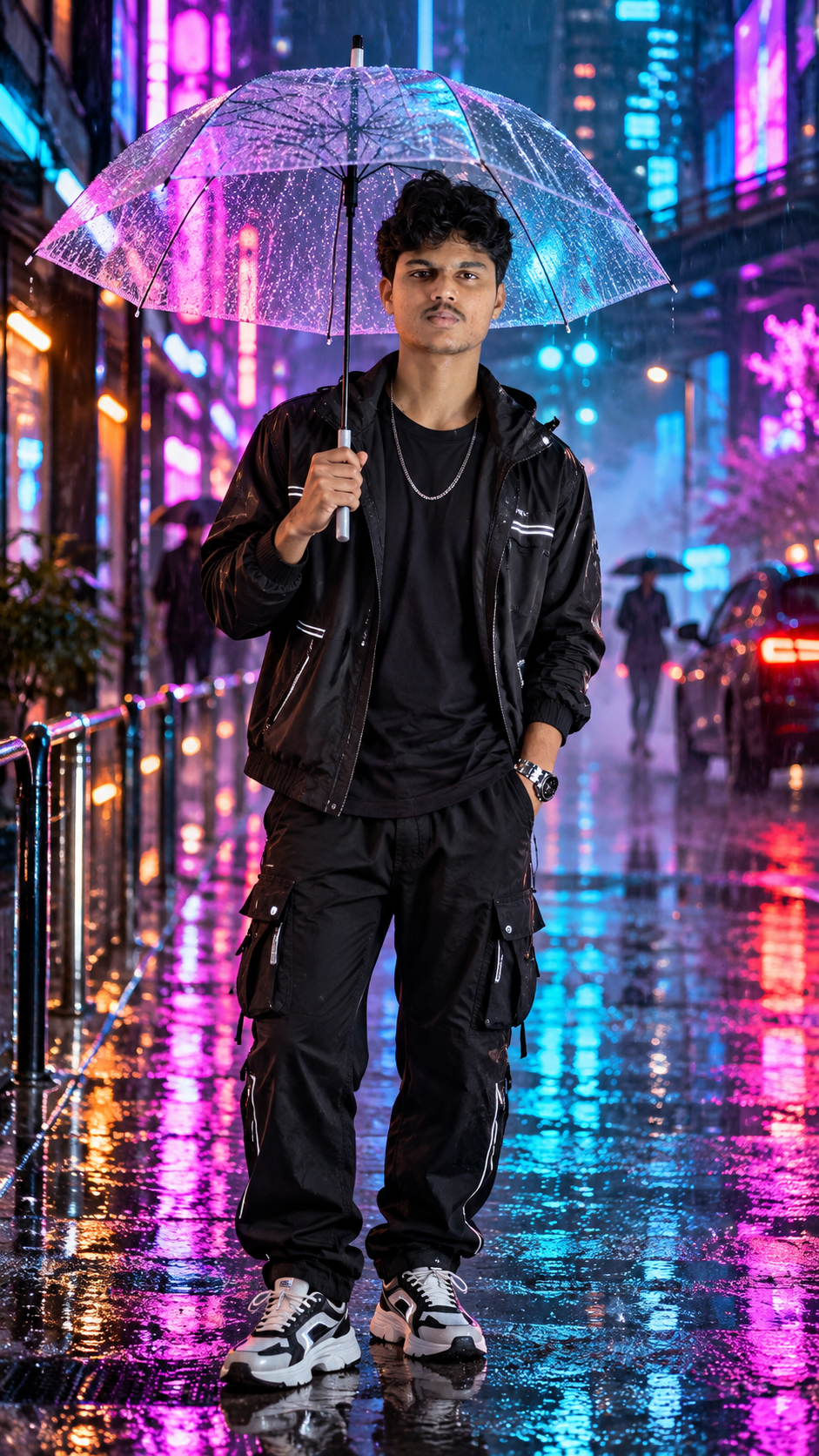
Create a cinematic rainy-night portrait with this neon rainy night AI photo editing prompt. The concept combines modern black streetwear, a transparent umbrella, colorful city lights, and reflections on wet pavement to create a dramatic yet realistic fashion photograph.
The prompt is designed for users who want to transform their own pictures into stylish nighttime portraits while maintaining their recognizable facial identity. Its main visual elements include pink and cyan neon lighting, realistic raindrops, glossy clothing details, and a vibrant urban background.
Upload your photograph to a compatible AI image editing tool, paste the prompt, and generate your edited portrait. For the best results, begin with a clear reference photo and check that your facial features, hands, umbrella, and body proportions remain natural.
Trending prompt
Neon Rainy Night AI Photo Editing Prompt for Boys – Cinematic Umbrella Portrait (2026)
◉ 6 Views♡ 0 Likes
Prompt 1
Neon Rainy Night AI Photo Editing Prompt for Boys – Cinematic Umbrella Portrait (2026)
Transform my uploaded photograph into an ultra-realistic, cinematic rainy-night streetwear fashion portrait. Use my uploaded image as the primary identity reference and preserve my natural appearance.rnrn1. Facial Identity and Realistic SkinrnrnPreserve my exact facial identity, facial proportions, natural skin tone, hairstyle, age, and recognizable features from the uploaded reference photograph. Keep the face genuinely human, with realistic skin pores, natural texture, subtle imperfections, authentic eyes, and natural lips. Do not change my jawline, nose, eye shape, or facial structure. Avoid excessive skin smoothing, artificial beauty filters, and plastic-looking skin.rnrn2. Outfit and AccessoriesrnrnDress me in a modern all-black streetwear outfit consisting of a glossy black lightweight hooded jacket with subtle white reflective stripes, a plain black crew-neck T-shirt, relaxed-fit black cargo trousers with multiple utility pockets, and chunky black-and-white athletic sneakers. Add a simple silver chain necklace and a realistic black wristwatch. The jacket should have believable water droplets and subtle wet-surface reflections, while the trousers should display natural fabric folds and realistic stitching.rnrn3. Transparent UmbrellarnrnPlace a large transparent umbrella above my head. The umbrella should have a clear waterproof canopy covered with small, sharply defined raindrops, realistic curved edges, dark supporting ribs, and a natural central shaft. I should hold the umbrella handle comfortably with one hand while keeping the other hand casually inside my trouser pocket. Ensure the fingers wrap naturally around the handle, with correct anatomy and realistic grip pressure.rnrn4. Pose and ExpressionrnrnCreate a confident, relaxed, full-body fashion pose. I am standing upright on a rain-soaked city sidewalk, looking directly toward the camera with a calm, composed expression. Keep my shoulders relaxed, body proportions realistic, and feet naturally positioned on the wet pavement. The pose should resemble an authentic photograph taken by a professional streetwear photographer rather than a stiff studio pose.rnrn5. Background and LocationrnrnSet the scene on a futuristic-looking urban shopping street at night, inspired by the vibrant atmosphere of Tokyo's neon-lit districts. Include tall buildings, colorful illuminated signs, blurred storefront lights, distant pedestrians carrying umbrellas, parked vehicles, metal pedestrian railings, and a narrow city sidewalk. The background should have realistic depth, atmospheric mist, and soft bokeh without distracting from the main subject.rnrn6. Neon Lighting and RainrnrnUse a cinematic combination of electric magenta, vivid pink, cyan, and deep blue neon lighting. Allow the neon lights to reflect naturally across the transparent umbrella, black jacket, wet pavement, and surrounding architecture. Include fine visible rainfall, realistic water droplets, small puddles, and colorful reflections stretching across the glossy street surface. Keep the face properly exposed with soft, natural illumination and realistic skin color despite the colorful surroundings.rnrn7. Camera and CompositionrnrnCapture a complete head-to-toe portrait with the entire umbrella and both sneakers visible. Use a professional full-frame camera aesthetic, approximately a 50mm lens perspective, natural perspective, eye-level camera positioning, balanced framing, and realistic depth of field. Keep the subject sharply focused while the neon buildings, pedestrians, and distant vehicles fall into a soft cinematic blur. Avoid exaggerated wide-angle distortion.rnrn8. Photographic QualityrnrnCreate a high-resolution, photorealistic fashion editorial with detailed fabric textures, natural facial features, accurate hands, realistic rain physics, balanced highlights, controlled shadows, and lifelike reflections. Preserve fine details in the umbrella canopy, jacket material, cargo pockets, sneakers, and wet pavement.rnrn9. Negative InstructionsrnrnNo face replacement, no altered identity, no artificial facial symmetry, no plastic skin, no cartoon effects, no CGI appearance, no excessive HDR, no oversaturated skin, no deformed hands, no extra fingers, no missing fingers, no duplicated limbs, no distorted legs, no floating feet, no warped umbrella, no broken umbrella ribs, no unrealistic rain, no impossible reflections, no blurry face, no fake text, no logos, and no watermarks.rnrnFinal Result: A premium, photorealistic rainy-night streetwear portrait featuring a transparent raindrop-covered umbrella, an all-black outfit, vibrant pink-and-cyan neon lights, wet reflective pavement, and authentic human facial details. The finished image should look like a real professional fashion photograph captured on a rainy city night.
What These Prompts Create
This prompt is designed to produce a cinematic, full-body streetwear photograph with the following visual elements:
- An all-black outfit featuring a glossy jacket, black T-shirt, and cargo trousers.
- Black-and-white chunky sneakers, a silver chain, and a wristwatch.
- A transparent umbrella covered in realistic raindrops.
- A confident standing pose with one hand holding the umbrella.
- A colorful nighttime cityscape illuminated by pink, magenta, cyan, and blue neon lights.
- Rain-soaked pavement with detailed reflections and small puddles.
- Distant pedestrians, urban buildings, storefronts, and vehicles.
- Natural facial details, realistic skin texture, and accurate body proportions.
- Professional fashion photography with cinematic depth of field.
- Balanced exposure that keeps the face recognizable against the colorful background.
The goal is to achieve a believable nighttime fashion portrait rather than an artificial illustration. The final appearance will depend on the uploaded reference photo and the image editing tool.
- An all-black outfit featuring a glossy jacket, black T-shirt, and cargo trousers.
- Black-and-white chunky sneakers, a silver chain, and a wristwatch.
- A transparent umbrella covered in realistic raindrops.
- A confident standing pose with one hand holding the umbrella.
- A colorful nighttime cityscape illuminated by pink, magenta, cyan, and blue neon lights.
- Rain-soaked pavement with detailed reflections and small puddles.
- Distant pedestrians, urban buildings, storefronts, and vehicles.
- Natural facial details, realistic skin texture, and accurate body proportions.
- Professional fashion photography with cinematic depth of field.
- Balanced exposure that keeps the face recognizable against the colorful background.
The goal is to achieve a believable nighttime fashion portrait rather than an artificial illustration. The final appearance will depend on the uploaded reference photo and the image editing tool.
How to Use These Prompts
1. Select a clear photograph in which your face is visible.
2. Open an AI image editing tool that supports reference image uploads.
3. Upload your original photograph.
4. Copy the complete rainy-night streetwear prompt.
5. Paste it into the image editing instruction box.
6. Generate the image while keeping the identity-preservation instructions.
7. Check the face, hands, umbrella handle, clothing details, and shoes.
8. If the neon lighting looks excessive, request softer pink and cyan reflections.
9. If the face changes noticeably, regenerate the image with stronger identity-preservation instructions.
10. Save the highest-resolution version available from your chosen tool.
Tip: If you want to use this concept for your own photo, keep the original facial reference and change only the background, outfit, lighting, or pose as needed.
2. Open an AI image editing tool that supports reference image uploads.
3. Upload your original photograph.
4. Copy the complete rainy-night streetwear prompt.
5. Paste it into the image editing instruction box.
6. Generate the image while keeping the identity-preservation instructions.
7. Check the face, hands, umbrella handle, clothing details, and shoes.
8. If the neon lighting looks excessive, request softer pink and cyan reflections.
9. If the face changes noticeably, regenerate the image with stronger identity-preservation instructions.
10. Save the highest-resolution version available from your chosen tool.
Tip: If you want to use this concept for your own photo, keep the original facial reference and change only the background, outfit, lighting, or pose as needed.
Tips for Better Results
- Use a clear reference photograph with visible facial features.
- Keep the original face and natural skin tone unchanged.
- Describe the transparent umbrella separately to improve its structure and details.
- Use realistic raindrops instead of excessive artificial water effects.
- Balance pink and cyan lighting so the skin does not become unnaturally colorful.
- Add realistic wet-pavement reflections for a more cinematic appearance.
- Keep the hands anatomically correct and the umbrella handle firmly held.
- Specify a full-body composition to keep the sneakers and umbrella visible.
- Use a natural camera perspective to avoid distorted legs and oversized shoes.
- Reduce background sharpness slightly to separate the subject from the city lights.
- Avoid excessive HDR, oversharpening, and artificial skin smoothing.
- Review the final image for distorted fingers, umbrella ribs, clothing edges, and reflections.
Who Are These Prompts For?
This rainy-night AI photo editing prompt is suitable for:
- Boys and men who want cinematic Instagram portraits.
- Social media users creating stylish profile pictures.
- Streetwear and urban fashion enthusiasts.
- Instagram creators preparing Reels covers and portrait posts.
- Photography enthusiasts experimenting with neon-night aesthetics.
- AI image editing beginners learning to write detailed prompts.
- Fashion bloggers creating rainy-season visual concepts.
- Users who want to experiment with nighttime backgrounds without arranging a physical photoshoot.
The concept can also be adapted to different outfits, umbrellas, city environments, and neon color combinations.
- Boys and men who want cinematic Instagram portraits.
- Social media users creating stylish profile pictures.
- Streetwear and urban fashion enthusiasts.
- Instagram creators preparing Reels covers and portrait posts.
- Photography enthusiasts experimenting with neon-night aesthetics.
- AI image editing beginners learning to write detailed prompts.
- Fashion bloggers creating rainy-season visual concepts.
- Users who want to experiment with nighttime backgrounds without arranging a physical photoshoot.
The concept can also be adapted to different outfits, umbrellas, city environments, and neon color combinations.
More Details
Prompt Category: AI Photo Editing Prompts for Boys
Visual Style: Cinematic urban streetwear, neon-noir photography, rainy-night fashion editorial.
Outfit: Glossy black jacket, black T-shirt, black cargo trousers, black-and-white sneakers, silver chain, and wristwatch.
Main Prop: Transparent umbrella with realistic raindrops and visible supporting ribs.
Background: Neon-lit urban shopping street with buildings, vehicles, distant pedestrians, and storefronts.
Lighting: Magenta, pink, cyan, and blue neon illumination balanced with natural facial lighting.
Weather: Nighttime rainfall with realistic water droplets and reflective pavement.
Pose: Full-body standing portrait, one hand holding the umbrella and the other resting in a trouser pocket.
Recommended Aspect Ratios:
- 4:5 for Instagram portrait posts.
- 9:16 for Instagram Stories and Reels covers.
- 3:4 for vertical fashion portraits.
- 16:9 for website banners and featured images.
Image Quality: High-resolution photorealism, detailed clothing textures, natural skin, accurate anatomy, and realistic reflections.
Customization: Change the jacket style, sneaker design, umbrella color, city location, or neon palette to create different variations while retaining the original identity.
Important: AI editing tools may modify small facial or anatomical details even when instructed not to. Review the generated image carefully before publishing.
Visual Style: Cinematic urban streetwear, neon-noir photography, rainy-night fashion editorial.
Outfit: Glossy black jacket, black T-shirt, black cargo trousers, black-and-white sneakers, silver chain, and wristwatch.
Main Prop: Transparent umbrella with realistic raindrops and visible supporting ribs.
Background: Neon-lit urban shopping street with buildings, vehicles, distant pedestrians, and storefronts.
Lighting: Magenta, pink, cyan, and blue neon illumination balanced with natural facial lighting.
Weather: Nighttime rainfall with realistic water droplets and reflective pavement.
Pose: Full-body standing portrait, one hand holding the umbrella and the other resting in a trouser pocket.
Recommended Aspect Ratios:
- 4:5 for Instagram portrait posts.
- 9:16 for Instagram Stories and Reels covers.
- 3:4 for vertical fashion portraits.
- 16:9 for website banners and featured images.
Image Quality: High-resolution photorealism, detailed clothing textures, natural skin, accurate anatomy, and realistic reflections.
Customization: Change the jacket style, sneaker design, umbrella color, city location, or neon palette to create different variations while retaining the original identity.
Important: AI editing tools may modify small facial or anatomical details even when instructed not to. Review the generated image carefully before publishing.
Related Prompts & Guides

10+ Best AI Birthday Photo Editing Prompts for Girls: Viral ChatGPT & Gemini Prompts (2026)
AI Birthday Photo Editing Prompts for Girls Want to create beautiful birthday photos without booking a…

Halloween AI Photo Prompts: 12 Gemini Prompts for Spooky, Cute and Cinematic Edits (2026)
Halloween AI Photo Prompts Every October, the same costume photos fill Instagram and Pinterest. Pumpkin patch…

10 Best AI Guitar Photo Prompts for Girls 2026 Aesthetic, Realistic & Cinematic Portraits for ChatGPT & Google Gemini
10 Best AI Guitar Photo Prompts for Girls (2026) Introduction: Create Beautiful AI Guitar Photos Are…

Viral Royal Girl AI Photo Editing Prompt 2026: Golden Jewellery & Pink Rose Look for ChatGPT and Google Gemini
Royal Girl Ai Photo Editing Prompt 2026 Introduction Aajkal royal traditional look wali AI photos social…