Viral Stadium AI Video Editing – Create Trending Stadium Cheer Videos Free
Social media par aajkal ek new AI trend kaafi viral ho raha hai. Instagram Reels, TikTok aur YouTube Shorts par log stadium me camera ke saamne cheer karte hue videos upload kar rahe hain. Sabse interesting baat ye hai ki inme se bahut si videos real nahi hoti — ye completely AI generated hoti hain.
Agar aap bhi apna stadium cheering video banana chahte ho, to ab aap easily sirf ek photo ki help se ye trend create kar sakte ho. Is article me hum step-by-step dekhenge ki aap free me viral stadium AI video kaise bana sakte ho.
What Is Viral Stadium AI Video Editing?
Trending Ai Cricket Stadium photo and Video Editing (Prompt+Tutorial) ek new AI trend hai jisme AI tools aapki normal photo ko realistic stadium cheering video me convert kar dete hain. Final result itna realistic lagta hai ki log easily differentiate nahi kar pate ki video AI generated hai ya real.
Is trend ka use creators:
Instagram Reels
YouTube Shorts
TikTok videos
Facebook Reels
ke liye kar rahe hain.
Why Is This Trend Going Viral?
Is trend ke viral hone ke kuch main reasons hain:
Realistic stadium camera effects
Cinematic crowd atmosphere
AI face animation
Easy one-click creation
High engagement on Instagram Reels
Aajkal log unique aur eye-catching content dekhna pasand karte hain, aur AI generated stadium videos exactly wahi provide karte hain.
How To Create Viral Stadium AI Image
Video banane se pehle aapko ek AI generated stadium image create karni hogi.
Step 1 – Download ChatGPT App
Sabse pehle:
Play Store open karein
ChatGPT app install karein
Gmail account se login karein
Step 2 – Upload Your Photo
Ab:
Plus icon par click karein
Apni clear selfie upload karein
Stadium AI prompt paste karein
Generate button par click karein
Best Prompt For Stadium AI Photo
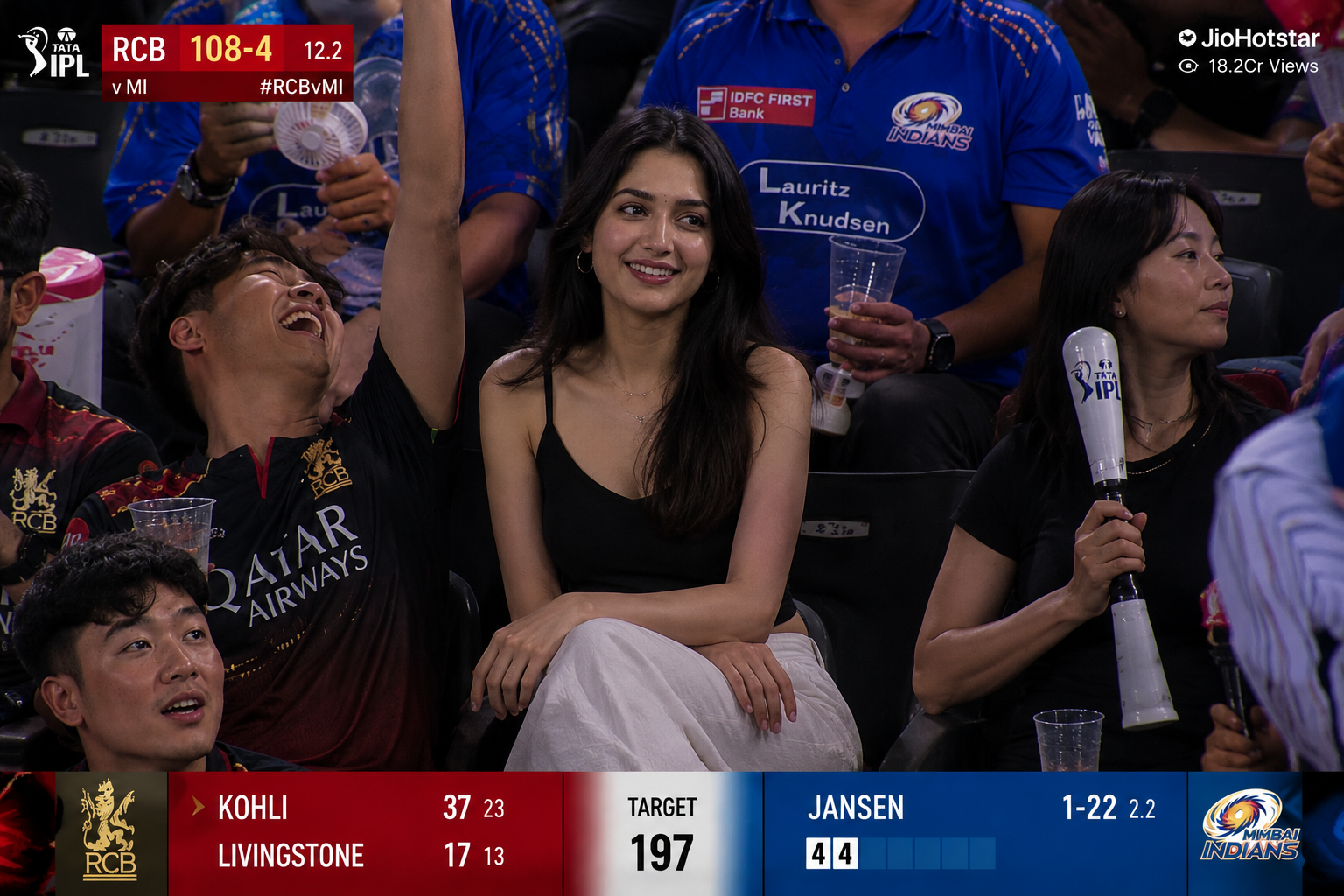
Create a realistic IPL cricket stadium audience scene during a live match broadcast. A beautiful young Indian girl with long black hair is sitting calmly in the crowd while people around her are cheering loudly and celebrating. She is wearing a stylish black sleeveless top with white pants, natural makeup, soft smile, realistic facial details, cinematic lighting, DSLR quality, ultra realistic skin texture.
Around her, cricket fans are wearing RCB and Mumbai Indians jerseys, waving cheering sticks and reacting excitedly. Add realistic IPL broadcast graphics on screen including scorecard, team logos, overs, player stats, and JioHotstar live streaming watermark. Packed cricket stadium in background with bright floodlights, energetic sports atmosphere, live TV camera angle, shallow depth of field, realistic crowd details, viral Instagram aesthetic, 4K ultra realistic sports photography.
Step 3 – Download Generated Image
Image generate hone ke baad usse download kar lein. Ye image video creation ke liye use hogi.
How To Create Viral Stadium AI Video
Ab image ko realistic cheering video me convert karte hain.
Step 1 – Open AI Video Tool
Google Flow AI video generator tool ko open karein aur login karein.
Step 2 – Create New Project
- “New Project” par click karein
- Generated stadium image upload karein
- AI video model select karein
Step 3 – Paste Video Prompt
Ab niche diya gaya video prompt paste karein.
Best AI Video Prompt
Create a realistic cinematic video of a beautiful young Indian girl sitting calmly inside a packed IPL cricket stadium during a live match while fans around her cheer loudly and celebrate. The girl has long black hair, wearing a stylish black sleeveless top and white pants, soft smile, natural facial expressions, ultra realistic skin details.

Crowd around her is shouting, waving cheering sticks, clapping, and reacting excitedly during the match. Add realistic IPL match atmosphere with bright stadium floodlights, live sports broadcast camera movement, zoom-in effect, crowd motion, dramatic cinematic lighting, realistic audience reactions, shallow depth of field, DSLR quality, ultra realistic sports video style.

Include realistic live cricket broadcast overlays such as scorecard, team logos, overs, player stats, and JioHotstar style streaming watermark. Make the video look exactly like a real IPL TV broadcast moment captured by stadium cameras. Viral Instagram reels aesthetic, 4K cinematic quality, smooth motion, realistic face consistency, natural blinking and movement.
Step 4 – Generate Video
Prompt submit karne ke baad AI automatically video generate karega. Usually video kuch minutes me ready ho jati hai.
How To Avoid Face Change Problem
Kai baar AI videos me face change ya distortion issue aa jata hai. Is problem ko avoid karne ke liye ye tips follow karein:
- HD quality photo use karein
- Front-facing selfie upload karein
- Face clear visible hona chahiye
- Background simple rakhein
- Blurry photos avoid karein
- Close-up image use karein
Ye simple steps follow karne se AI aapka face accurately maintain karta hai.
Tips To Make Your Video Viral
Agar aap Instagram par reach increase karna chahte ho, to ye tips useful rahenge:
- Trending music use karein
- Reels format me upload karein
- Short captions likhein
- Viral hashtags use karein
- Night timing me post karein
- High quality export karein
Best Hashtags
AIVideo #StadiumTrend #InstagramReels #AIEditing ViralVideo #AIPrompt #TrendingReels #CinematicEdit AIPhotoEditing #ViralTrend
Final Words
AI tools ki help se ab koi bhi person bina editing skills ke professional aur viral looking videos create kar sakta hai. Viral Stadium AI Video trend bhi isi wajah se itna popular ho raha hai.
Agar aap bhi social media par unique content upload karna chahte ho, to ye trend definitely try kar sakte ho. Sirf ek clear photo aur proper AI prompt ki help se aap realistic stadium cheering video create kar sakte ho — wo bhi free me.