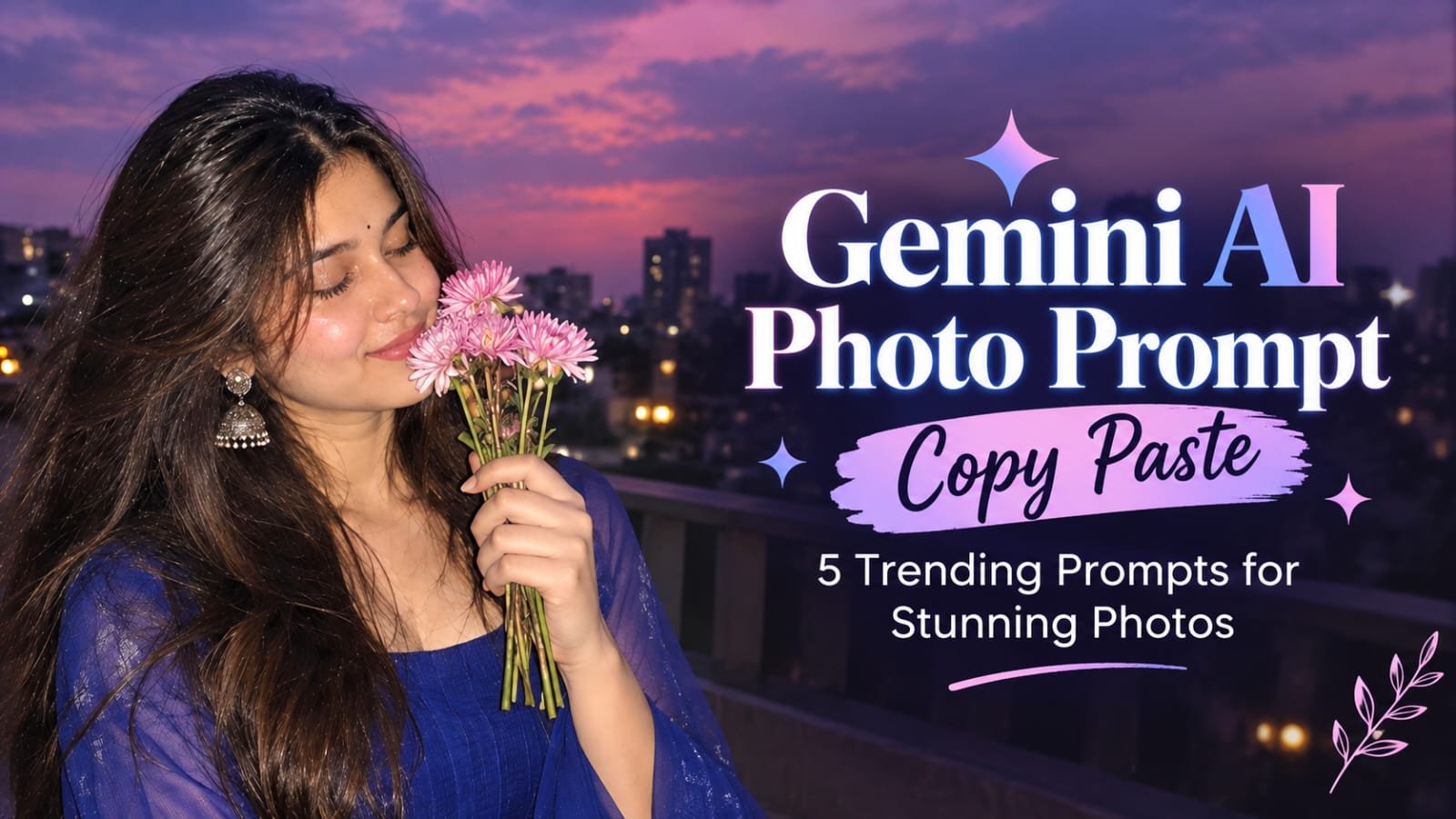
Gemini AI Photo Prompt Copy Paste: 5 Trending Prompts for Stunning Photos
AI photo editing has become an easy way to turn a simple photo into a stylish, creative, and realistic portrait. ... <p class="read-more-container"><a title="Gemini AI Photo Prompt Copy Paste: 5 Trending Prompts for Stunning Photos" class="read-more button" href="https://trendingprompt.in/trendingprompt-gemini-ai-photo-prompt-copy-paste/#more-2723" aria-label="More on Gemini AI Photo Prompt Copy Paste: 5 Trending Prompts for Stunning Photos">Read more</a></p>
Related Prompts & Guides

10+ Best AI Birthday Photo Editing Prompts for Girls: Viral ChatGPT & Gemini Prompts (2026)
AI Birthday Photo Editing Prompts for Girls Want to create beautiful birthday photos without booking a…

Halloween AI Photo Prompts: 12 Gemini Prompts for Spooky, Cute and Cinematic Edits (2026)
Halloween AI Photo Prompts Every October, the same costume photos fill Instagram and Pinterest. Pumpkin patch…

10 Best AI Guitar Photo Prompts for Girls 2026 Aesthetic, Realistic & Cinematic Portraits for ChatGPT & Google Gemini
10 Best AI Guitar Photo Prompts for Girls (2026) Introduction: Create Beautiful AI Guitar Photos Are…
AI photo editing has become an easy way to turn a simple photo into a stylish, creative, and realistic portrait. With the right Gemini AI photo prompt, you can change the outfit, background, lighting, pose, and overall mood while keeping your facial identity natural.
If you are looking for Gemini AI photo prompts that you can simply copy and paste, this collection is designed for you. These prompts are especially useful for creating trendy Instagram-style portraits, traditional looks, cinematic photos, and aesthetic edits.
Why Use Gemini AI Photo Prompts?
Writing a detailed prompt can be difficult, especially when you want the AI to understand exactly what should change and what should remain unchanged.
A good prompt can help you describe:
- Facial identity and natural features
- Outfit and color
- Hairstyle
- Pose and expression
- Background and location
- Lighting and camera style
- Image quality and aspect ratio
The prompts below are written in a copy-paste-friendly format, so you can try them directly with your photo.
How to Use These Gemini AI Photo Prompts
Before trying the prompts, follow these simple steps.
Step 1: Choose Your Photo
Select a clear photo where your face is visible. A well-lit image generally gives better results.
Step 2: Upload Your Photo to Gemini
Open Gemini and upload the photo you want to edit.
Step 3: Copy One Prompt
Choose any prompt from this article and copy the complete text.
Step 4: Paste the Prompt
Paste the prompt along with your uploaded image and let Gemini create the edited photo.
Step 5: Make Small Changes
If you want a different outfit color, background, pose, or lighting, simply modify that part of the prompt and try again.
Prompt 1-Hands in Hair, Eyes Closed
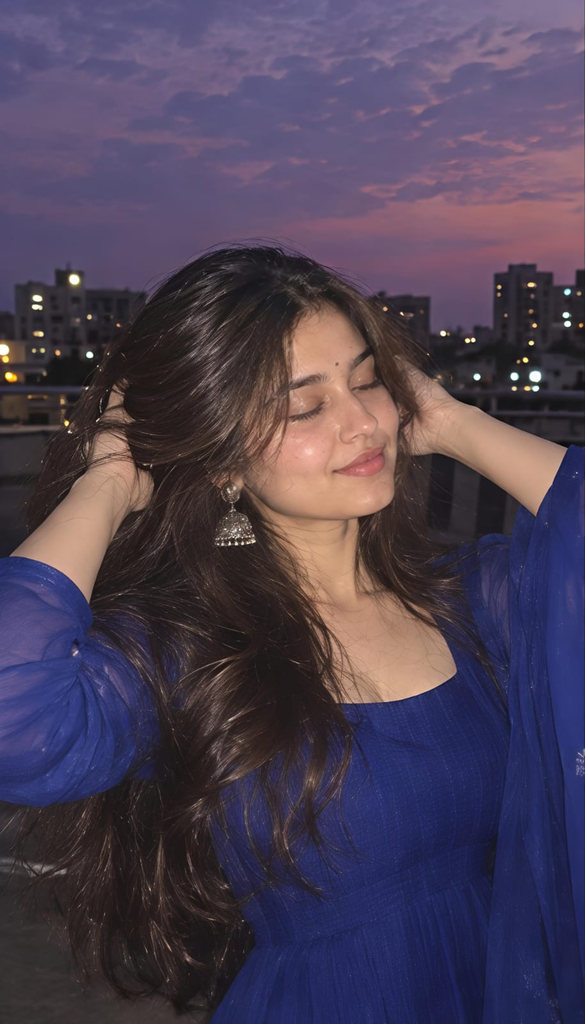
Use my uploaded photo as the ONLY identity reference. Preserve my recognizable facial identity, natural face shape, eyes, eyebrows, nose, lips, skin tone, and realistic skin texture. Do not reshape, replace, beautify, or alter my face. Do not use my uploaded photo for pose, outfit, hairstyle, background, or composition. Create a highly realistic dreamy evening rooftop portrait of me wearing a royal/cobalt blue Indian ethnic outfit with a fitted square-neck top and sheer long sleeves, subtle traditional detailing, and elegant silver jhumka earrings. Give me long, loose, naturally voluminous dark-brown hair falling over my shoulders and down my back. Pose: standing on a rooftop at dusk, body facing the camera, both arms raised with both hands gently placed in my hair, slightly lifting and arranging the hair. Tilt my head slightly to one side with eyes softly closed and a subtle peaceful smile. Background: urban rooftop, distant apartment buildings, rooftop railing, a few city lights, beautiful purple-pink twilight sky. Use soft ambient dusk lighting combined with a subtle direct-camera flash, creating a dreamy candid social-media aesthetic. Natural skin texture, realistic hair strands, slight atmospheric softness, shallow depth of field, cinematic 35mm photography, soft film grain, realistic proportions, photorealistic, 9:16 vertical.
Prompt 2 — One Hand in Hair
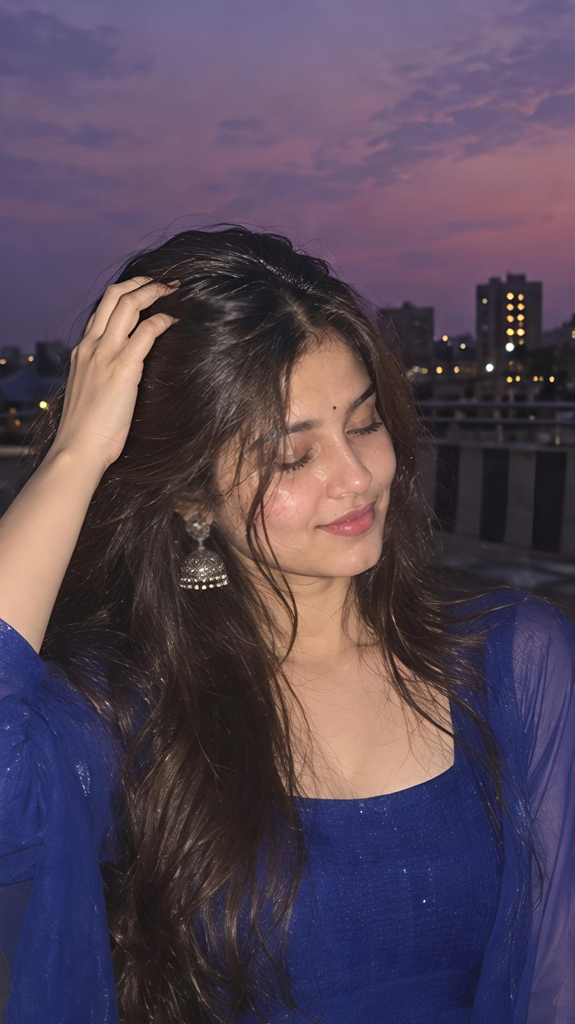
Use my uploaded photo as the ONLY identity reference. Preserve my exact recognizable facial identity, natural facial structure, skin tone, eyes, eyebrows, nose, lips, and realistic skin texture. Do not modify or beautify the face. Create a photorealistic dreamy rooftop portrait at purple-pink dusk. Dress me in the same royal/cobalt blue ethnic outfit with a square neckline, sheer full sleeves, delicate detailing, and silver jhumka earrings. Pose: standing naturally on the rooftop, one hand raised and gently touching the hair near the top/side of my head, while the other arm rests naturally down. My head is slightly lowered and turned toward one side, eyes closed, with a soft relaxed smile. A few loose strands of hair naturally fall across my face. Keep long, open, naturally wavy dark-brown hair flowing over my shoulders and chest. Background: rooftop railing, distant city buildings and glowing windows under a dreamy violet, lavender and pink sunset sky. Soft flash-lit face with subtle evening ambient light, realistic shadows, slight motion in the hair, natural skin texture, candid Instagram-style photography, 35mm film look, gentle grain, shallow depth of field, photorealistic, 9:16.
Prompt 3 — Holding Pink Flowers
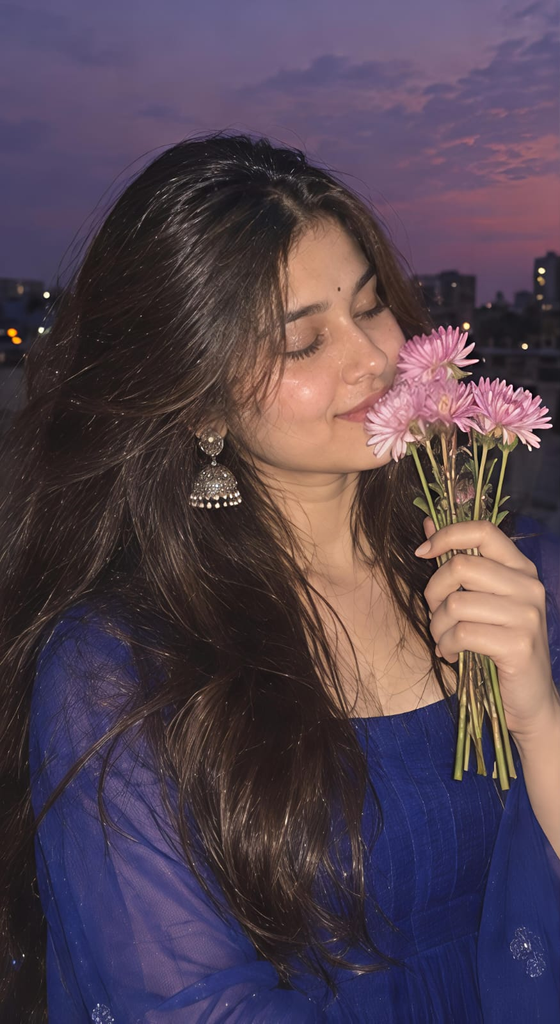
Use my uploaded photo as the ONLY identity reference. Preserve my recognizable facial identity, natural face shape, eyes, eyebrows, nose, lips, skin tone, and realistic facial texture. No face replacement, reshaping, excessive smoothing, or beauty filter. Create a dreamy photorealistic evening rooftop portrait. I am wearing a royal/cobalt blue traditional Indian outfit with a square neckline, sheer long sleeves and subtle embroidery, paired with elegant silver jhumka earrings. Give me long, loose, naturally wavy dark-brown hair flowing around my shoulders. Pose: gently turn my face slightly downward and to the side with eyes closed and a soft peaceful smile. In one hand, hold a small natural bouquet of fresh pale-pink chrysanthemum flowers close to my nose and cheek, as if softly smelling the flowers. The flowers partially overlap the lower side of my face. Keep the hand and fingers anatomically natural. Background: open urban rooftop during purple-pink twilight, distant buildings, rooftop railing, tiny city lights and a beautiful dusky sky. Soft direct flash on the subject mixed with ambient evening light, dreamy atmospheric glow, realistic skin, natural hair strands, subtle 35mm film grain, shallow depth of field, candid photography, highly realistic, 9:16 vertical.
Prompt 4 — Over-the-Shoulder Look
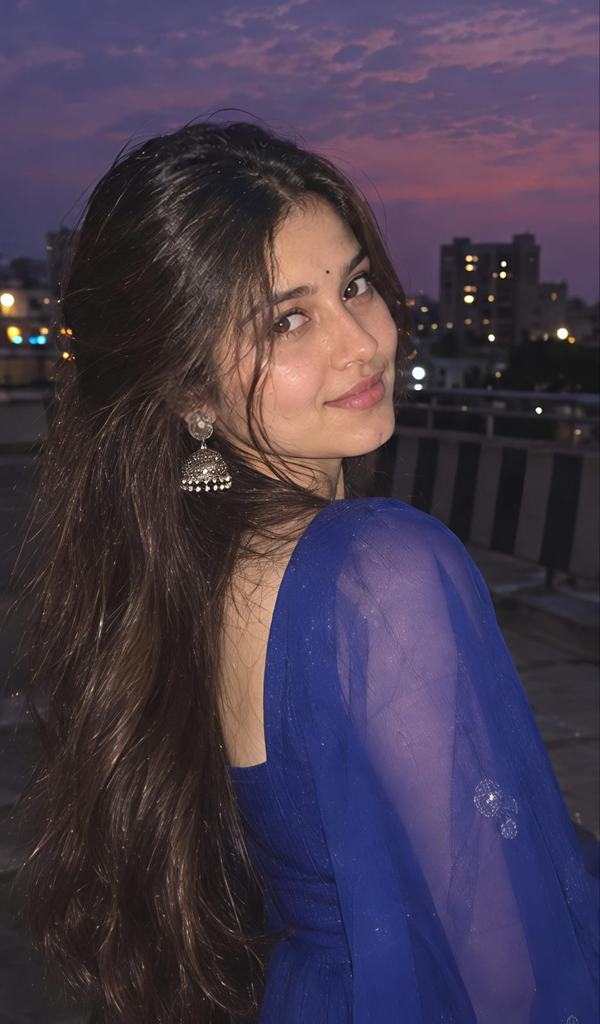
Use my uploaded photo as the ONLY identity reference. Preserve my recognizable facial identity, natural facial structure, eyes, eyebrows, nose, lips, skin tone and realistic skin texture. Do not alter, reshape, replace, or beautify my face. Create a highly realistic dreamy rooftop portrait at blue-purple dusk. I am wearing a royal/cobalt blue traditional Indian outfit with sheer long sleeves and subtle embroidery, with elegant silver jhumka earrings. Pose: my body is turned away from the camera in a three-quarter/back-facing position, showing my back and shoulder. My long, loose dark-brown hair flows naturally down my back. Turn my head back over my shoulder toward the camera, making gentle eye contact with a soft subtle smile. Background: urban rooftop with dark railing, distant apartment buildings, scattered glowing windows and a deep purple-pink evening sky. Use a subtle direct flash illuminating the face and hair while keeping the city background dim and atmospheric. Natural hair movement, realistic skin texture, cinematic depth of field, soft dreamy blur, authentic 35mm film photography, slight grain, candid social-media aesthetic, photorealistic, 9:16 vertical. Important: Remove all Instagram/Reels interface elements, usernames, buttons, likes, comments, captions, watermarks and text. Only create the clean photograph.
Prompt 5 — Trending Cinematic Look
Use my uploaded photo as the ONLY identity reference. Preserve my recognizable facial identity, natural face shape, eyes, eyebrows, nose, lips, skin tone, and realistic skin texture. Do not replace, reshape, smooth, or beautify the face.
Create a glamorous but natural Indian saree portrait. Dress me in a deep crimson-blue saree with a matching fitted blouse and minimal elegant jewelry.
Keep my dark hair naturally wavy and flowing over one shoulder. Create a graceful standing pose with one hand lightly holding the saree near the waist and the other relaxed naturally.
Set the scene in a lush evening garden with warm cinematic light, green foliage, soft bokeh, and a beautiful sunset-to-evening atmosphere.
Create a realistic DSLR portrait with an 85mm lens look, shallow depth of field, natural skin texture, realistic fabric details, subtle shadows, and cinematic lighting.
Vertical 9:16, high-resolution photorealistic image, elegant and natural, no text, no watermark, no Instagram or Snapchat interface.
Tips for Getting Better Gemini AI Photo Results
1. Use a Clear Reference Photo
Choose a photo where your face is clearly visible. Avoid heavily filtered or extremely blurry images.
2. Tell Gemini What the Photo Is Used For
For identity-based editing, wording such as “Use my uploaded photo as the ONLY identity reference” helps make the intended role of the reference clear.
3. Describe the New Pose Clearly
Instead of writing only “same pose,” describe the pose you actually want, such as:
“Standing with one hand gently touching the hair while looking slightly toward the camera.”
This gives the AI a clearer instruction.
4. Specify the Outfit Color
If you want a particular aesthetic, mention the exact color instead of simply saying “trendy dress.”
For example:
- Cherry red
- Burgundy
- Dusty rose
- Royal purple
- Icy blue
- Deep emerald
5. Add Camera and Lighting Details
Words such as 85mm lens, shallow depth of field, cinematic lighting, natural skin texture, soft bokeh, and realistic shadows can help establish the photography style.
Common Gemini AI Photo Editing Mistakes to Avoid
Avoid Saying Only “Make It Beautiful”
This is too vague. Explain the outfit, background, lighting, pose, and overall style you want.
Avoid Overloading the Prompt
A prompt should be detailed but organized. Too many conflicting instructions can produce inconsistent results.
Avoid Using the Reference Photo for Everything
If you only want the face from your uploaded image, clearly state that it is the identity reference only. Describe the new outfit, pose, hairstyle, and background separately.
Avoid Forgetting Negative Instructions
If you don’t want text, watermarks, social-media elements, or artificial beauty filters, mention them clearly.
Final Thoughts
These 5 Gemini AI photo prompts can help create different styles from a single reference photo, from a dreamy rooftop portrait to a traditional saree look and cinematic nighttime photography.
The biggest advantage of a detailed prompt is that you can control the important elements of the final image instead of relying on a short instruction. Start with one prompt, generate your image, and then make small changes to the color, pose, background, or lighting until you get the look you want.
Save these prompts for your next AI photo editing session and copy-paste the one that matches your style.