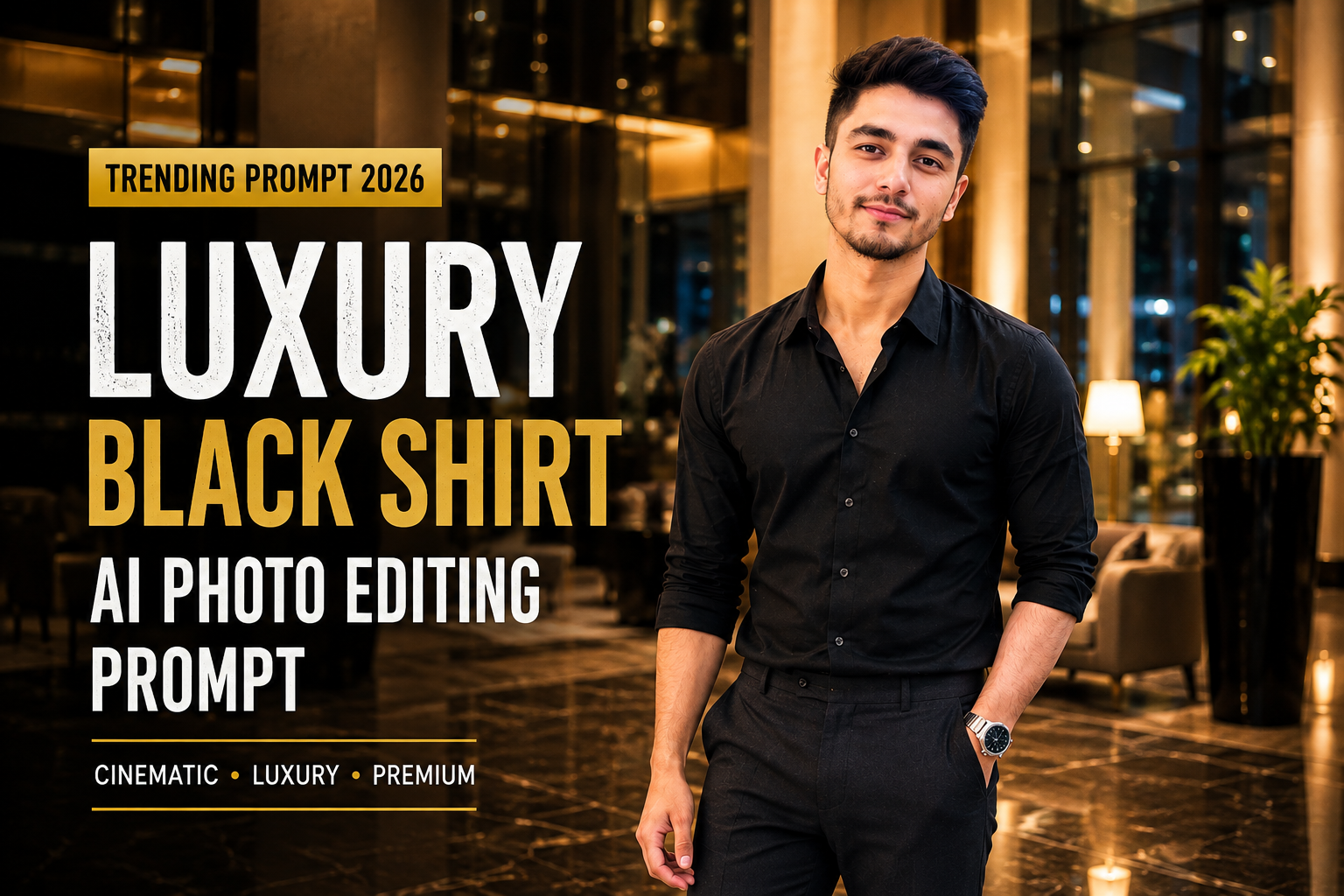
Men’s AI photo editing is moving toward realistic fashion photography, cinematic lighting, luxury interiors, and natural-looking portraits. One of the most versatile styles for boys is the Luxury Black Shirt AI Photo Editing Prompt, which combines a clean black outfit, premium surroundings, controlled lighting, and professional camera aesthetics.
This style works especially well for Instagram profile pictures, fashion posts, WhatsApp DP, reels covers, and lifestyle photography.
The prompt below is designed to transform an ordinary boy’s photo while keeping his face, hairstyle, skin tone, body proportions, and recognizable identity natural.
What Is a Luxury Black Shirt AI Photo Editing Prompt?
A Luxury Black Shirt AI Photo Editing Prompt gives an AI image editor detailed instructions to turn an ordinary photograph into a premium fashion portrait.
It can control:
- Outfit
- Location
- Lighting
- Pose
- Camera perspective
- Background
- Shadows
- Reflections
- Skin texture
- Color grading
- Overall photography style
The key is to create a realistic photograph rather than an exaggerated AI portrait.
Trending Luxury Black Shirt AI Photo Editing Prompt
Copy the prompt below:
Transform my uploaded photo into a premium cinematic men's fashion portrait while preserving my recognizable face, facial structure, hairstyle, natural skin tone, body proportions, and overall identity.

Use my uploaded photo as the strict identity reference. Keep my original facial structure, eye shape, nose, lips, jawline, hairstyle, skin tone, and recognizable characteristics consistent.

Do not replace my face with another person. Do not reshape, redesign, excessively beautify, or artificially enhance my facial features.

Place me standing casually inside a sophisticated modern luxury hotel lobby during the evening. The environment should feature elegant marble flooring, warm architectural lighting, large glass panels, tasteful furniture, subtle decorative plants, and refined modern interior details.

Keep the luxury environment realistic and understated. Avoid excessive decoration, unrealistic architecture, or an overly artificial appearance.

Dress me in a premium fitted black shirt with the sleeves slightly rolled up, tailored charcoal-black trousers, clean minimalist black leather shoes, and a simple silver wristwatch.

Keep the clothing realistic with authentic fabric texture, natural folds, stitching, and believable proportions.

Give me a relaxed confident pose with one hand naturally placed inside my trouser pocket and the other resting casually beside my body.

Keep my shoulders relaxed and my posture natural. Do not exaggerate muscles or make the body unnaturally muscular.

Maintain a calm confident facial expression with a subtle natural smile. Do not dramatically change my original expression or facial structure.

Use warm luxury interior lighting from the ceiling and nearby architectural lights. Add soft directional illumination across my face and clothing with realistic shadows underneath the chin, arms, and clothing folds.

Create subtle reflections on the polished marble floor and glass surfaces. Make sure reflections follow the correct perspective and lighting direction.

Use a professional 50mm photography perspective with realistic depth of field. Keep my face, eyes, hairstyle, hands, and clothing sharply detailed while allowing the distant hotel interior to become softly blurred.

Preserve natural skin texture, subtle pores, realistic facial details, individual hair strands, authentic fabric texture, accurate hands, natural body proportions, and physically consistent shadows.

Use a sophisticated color palette consisting of black, charcoal, warm beige, muted gold, dark brown, and subtle cream tones.

Apply subtle cinematic color grading with controlled contrast, natural skin tones, soft highlights, and detailed shadows.

Add very subtle professional camera grain and realistic lens depth without making the image look heavily filtered.

The final image should look like an authentic high-end men's fashion campaign photographed inside a luxury hotel, not an AI-generated image.

Keep the original identity and natural appearance unchanged while realistically transforming the outfit, environment, lighting, and photography style.

Negative prompt:
distorted face, changed identity, different person, altered facial structure, artificial eyes, unnatural smile, plastic skin, excessive skin smoothing, beauty filter, unrealistic facial enhancement, exaggerated muscles, oversized body, small head, oversized head, unnatural body proportions, deformed hands, extra fingers, missing fingers, duplicated limbs, warped clothing, floating accessories, distorted hotel interior, duplicate furniture, duplicate person, unrealistic reflections, fake marble, warped glass, incorrect perspective, excessive HDR, oversaturated colors, excessive glow, cartoon, anime, illustration, blurry face, low resolution, fake skin texture, bad perspective, messy composition, artificial background, unrealistic shadows
Why This Style Works
The black-shirt aesthetic is simple but visually powerful. Dark clothing creates a clean silhouette while warm hotel lighting adds depth and a premium appearance.
Black Outfit
A fitted black shirt and dark trousers create a sophisticated masculine fashion look without requiring excessive accessories.
Luxury Interior
Marble, glass, warm lights, and modern architecture naturally create a premium lifestyle atmosphere.
Cinematic Lighting
Soft directional light gives the face and clothing more depth while avoiding the flat appearance of ordinary indoor photography.
Natural Face
Instead of asking the AI to make the subject “perfect,” the prompt focuses on preserving natural facial details.
How to Get Better Results
Start With a Clear Photo
Use a sharp photograph where the face and hairstyle are clearly visible.
Avoid heavily filtered source images because they can make identity preservation more difficult.
Keep the Body Proportional
If the AI makes the head too large or body too small, add:
Maintain realistic head-to-body proportions, natural shoulder width, realistic limb length, and anatomically correct body proportions.
Avoid Excessive Muscles
For a fashion portrait, a natural physique usually looks more realistic than exaggerated muscles.
Add:
Keep my natural body shape and physique. Do not add exaggerated muscles or alter my natural proportions.
Black Shirt Street-Style Variation
For an urban fashion look, replace the hotel environment with:
Place me on a sophisticated modern city street during blue hour, surrounded by glass buildings, subtle storefront lights, parked cars, street lamps, and distant pedestrians. Keep the background softly blurred and realistic.
This creates a more casual streetwear aesthetic.
Black Shirt Night Portrait Variation
For a dramatic nighttime look:
Place me outside a modern luxury building at night. Use warm architectural lights combined with cool blue ambient city lighting, wet pavement reflections, subtle traffic lights, and cinematic background bokeh.
Black Shirt Rooftop Variation
For an Instagram-friendly outdoor portrait:
Place me on a modern rooftop during sunset with a distant city skyline, warm golden sunlight, subtle atmospheric haze, clean architectural lines, and realistic depth of field.
Best Camera Settings
| Photography Element | Recommended Style |
|---|---|
| Lens | 50mm |
| Lighting | Soft directional |
| Perspective | Natural |
| Depth of field | Moderate |
| Focus | Face and upper body |
| Background | Cinematic blur |
| Color | Black + warm neutrals |
| Finish | Subtle film grain |
| Composition | Vertical portrait |
For Instagram, a 4:5 vertical composition works well. For Reels and Stories, use 9:16.
Common AI Problems
Face Doesn’t Match
Add:
Treat the uploaded face as a strict identity reference and preserve the original facial structure, proportions, hairstyle, eye shape, nose, lips, jawline, and natural skin tone.
Head Looks Too Large
Add:
Maintain a realistic head-to-body ratio and natural camera perspective. Do not enlarge the head or shrink the body.
Hands Look Wrong
Add:
Generate anatomically accurate hands with five natural fingers, realistic joints, and natural interaction with clothing.
Hotel Looks Artificial
Add:
Create physically realistic hotel architecture, correctly scaled furniture, natural materials, realistic lighting, and believable reflections.
Frequently Asked Questions
Can I use this prompt for Instagram?
Yes. This style works well for Instagram posts, profile pictures, Reels covers, and fashion content.
Can I change the black shirt?
Yes. You can replace it with a black T-shirt, blazer, leather jacket, kurta, denim jacket, or another outfit.
Can I use this prompt with Gemini?
Yes. It can be adapted for Gemini and other AI image editors that support photo uploads and detailed image editing instructions.
How can I make the photo look more realistic?
Use a clear source image, realistic lighting, natural skin texture, accurate hands, correct body proportions, and subtle color grading. Avoid excessive beauty filters and HDR effects.
What aspect ratio should I use?
Use 4:5 for Instagram feed portraits and 9:16 for Stories or Reels covers.
Final Thoughts
The Luxury Black Shirt Boys AI Photo Editing Prompt 2026 is a versatile way to transform an ordinary male portrait into a premium cinematic fashion photograph.
The combination of a clean black outfit, luxury surroundings, warm lighting, realistic reflections, and professional camera depth creates a sophisticated social-media aesthetic.
For the best result, prioritize face preservation, realistic body proportions, natural skin texture, accurate hands, and consistent lighting. Subtle editing usually looks much more authentic than excessive AI effects.