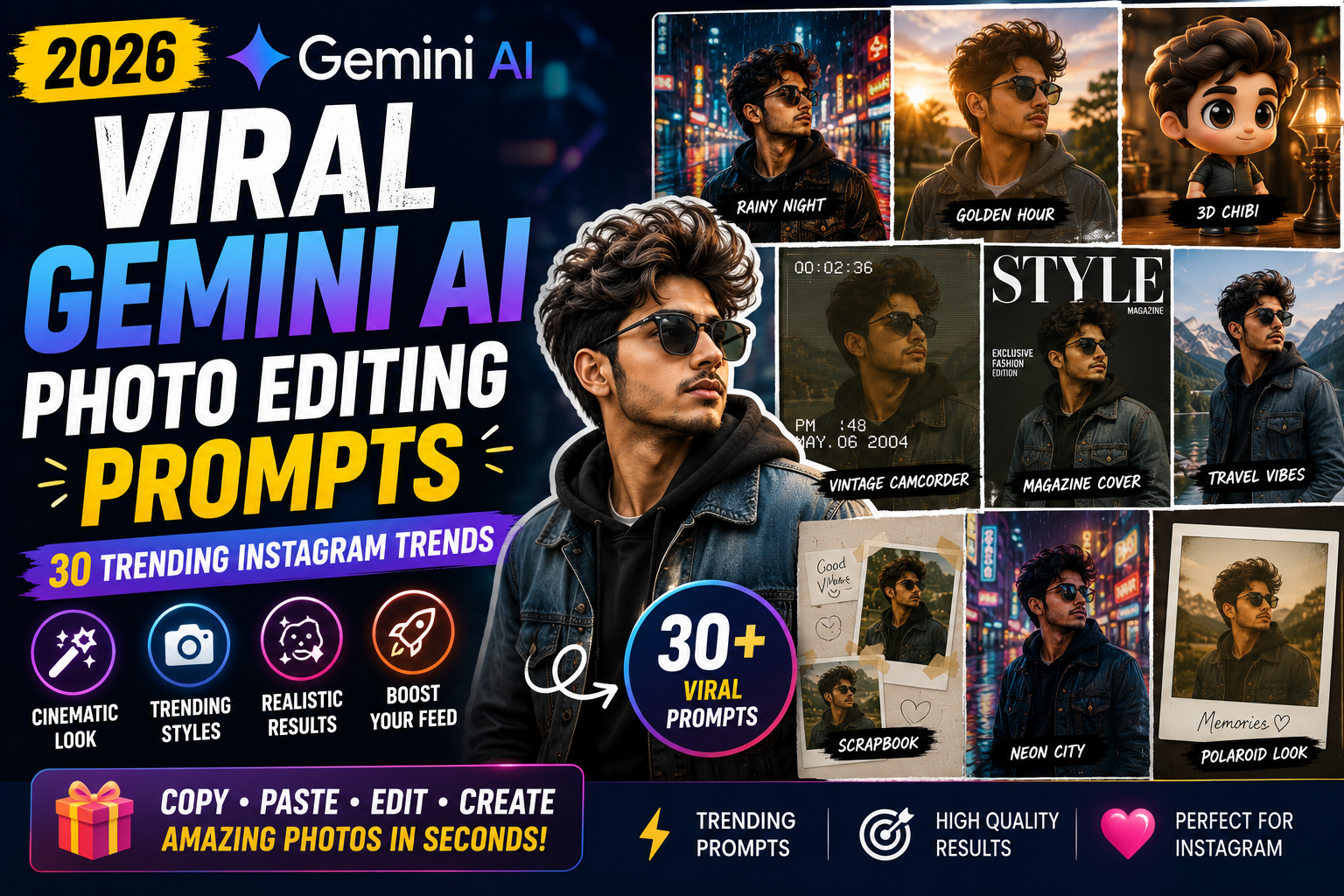
Want to make your ordinary photos look more cinematic, stylish and eye-catching with AI?
Gemini AI photo editing prompts make it possible to transform a normal selfie or portrait into a movie-style scene, retro photograph, magazine cover, travel portrait, Y2K edit, romantic couple photo and many other creative styles.
In 2026, AI photo editing is moving beyond simple background removal and beauty filters. People are experimenting with cinematic storytelling, nostalgic camera aesthetics, collectible characters, editorial photography, retro designs and social-media-friendly visual concepts.
This guide contains 30 viral Gemini AI photo editing prompts that you can copy, customize and try with your own photos.
What Are Gemini AI Photo Editing Prompts?
Gemini AI photo editing prompts are text instructions that describe how you want an uploaded photograph to be changed.
Instead of manually adjusting dozens of settings, you can describe the desired:
- Background
- Lighting
- Outfit
- Camera style
- Pose
- Environment
- Color grading
- Mood
- Photography style
- Composition
For example, instead of simply asking Gemini to “make my photo cinematic,” you can describe a rainy city street, neon reflections, dramatic lighting, shallow depth of field and a professional movie-camera look.
The more clearly you describe the desired result, the easier it is for the AI to understand your creative direction.
How to Use These Viral Gemini Prompts
Using these prompts is simple.
Step 1: Select Your Photo
Choose a clear selfie, portrait or full-body photograph.
Step 2: Upload It to Gemini
Open Gemini and upload your image where image editing is available.
Step 3: Choose a Prompt
Copy one of the prompts below.
Step 4: Customize It
Change the location, outfit, lighting or mood according to your preference.
Step 5: Generate the Edit
Let Gemini create the edited image.
Step 6: Refine the Result
If the result isn’t exactly what you want, give Gemini a short follow-up instruction.
For example:
Keep the entire image unchanged, but make the lighting softer and preserve my original facial features.
30 Viral Gemini AI Photo Editing Prompts
1. Cinematic Movie Scene Prompt
Prompt:
Transform my uploaded photo into a cinematic movie scene. Keep my facial identity, natural skin texture, hairstyle and body proportions recognizable. Place me in a dramatic urban environment during blue hour with atmospheric lighting, subtle haze, realistic shadows and cinematic depth of field. Add professional film-style color grading and realistic environmental details. Make the image look like a frame from a high-budget movie rather than an artificial AI image.
2. 90s Film Camera Prompt
Prompt:
Edit this photo to look like an authentic photograph captured with a 1990s film camera. Preserve my facial identity, hairstyle, expression and natural appearance. Add subtle film grain, realistic flash, slightly imperfect exposure, soft colors and natural photographic texture. Avoid excessive sharpening and beauty retouching. Make the final image feel like a genuine old photograph.
3. Rainy Monsoon Portrait
Prompt:
Turn my photo into a cinematic rainy monsoon portrait. Keep my face, hairstyle, body proportions and natural appearance recognizable. Place me on a rain-soaked city street with wet pavement, subtle reflections, falling rain and soft atmospheric lighting. Add realistic shadows and shallow depth of field. Create a moody but natural photograph suitable for Instagram.
4. 3D Chibi Character
Prompt:
Transform the person in this photo into a cute high-quality 3D chibi character while retaining recognizable facial characteristics, hairstyle and outfit details. Give the character slightly exaggerated proportions, polished 3D textures and expressive features. Place the character in a colorful miniature environment with soft studio lighting and realistic shadows. Make it look like a professionally designed collectible character.
5. Movie Poster Portrait
Prompt:
Transform my uploaded portrait into a dramatic cinematic movie-poster style image. Preserve my recognizable facial identity and hairstyle. Create a visually powerful background with atmospheric lighting, cinematic contrast and subtle environmental details. Position me like the main character of a premium film poster. Leave clean negative space around the composition for a title while keeping the image realistic.
6. Vintage Camcorder Look
Prompt:
Convert this photo into an authentic early-2000s camcorder-style photograph. Keep my facial identity and appearance unchanged. Add subtle digital noise, slightly imperfect exposure, realistic flash, soft colors and nostalgic home-video aesthetics. Do not make the image excessively blurry. Make it look like a genuine frame captured from an old personal video camera.
7. Luxury Magazine Cover
Prompt:
Turn my portrait into a high-end fashion magazine cover photograph. Preserve my face, hairstyle, natural skin texture and body proportions. Create a sophisticated editorial studio environment with professional lighting, subtle shadows and premium fashion photography composition. Leave clean negative space around me for magazine typography. Keep the result realistic and elegant.
8. Scrapbook Photo Collage
Prompt:
Transform my uploaded photo into a stylish handmade scrapbook composition. Keep my original face and recognizable appearance. Place the main photo among realistic paper textures, small handwritten-style decorative elements, tape, subtle stickers and printed-photo borders. Use a warm nostalgic color palette and natural imperfections. Make the result look like a real physical scrapbook rather than a digital template.
9. Y2K Aesthetic
Prompt:
Give this photo a stylish early-2000s Y2K aesthetic. Preserve my facial identity, hairstyle and natural appearance. Add subtle metallic details, retro digital-camera flash, glossy textures, nostalgic colors and fashionable early-2000s styling. Keep the image photorealistic and avoid turning it into a cartoon.
10. Golden Hour Cinematic Portrait
Prompt:
Transform my photo into a professional golden-hour portrait. Keep my face, hairstyle and body proportions unchanged. Place me outdoors shortly before sunset with warm sunlight coming from the side, realistic highlights on the hair, soft shadows and a naturally blurred background. Use cinematic composition and realistic photography.
11. Neon City Night
Prompt:
Edit this portrait into a cinematic neon city-night photograph. Preserve my facial identity and natural appearance. Place me on a modern city street surrounded by colorful neon signs and wet pavement reflections. Add realistic night lighting, subtle atmospheric haze and shallow depth of field. Make the image look like a professionally photographed scene from a modern movie.
12. Cozy Cafe Aesthetic
Prompt:
Turn my photo into a cozy modern cafe portrait. Keep my facial identity, hairstyle and appearance recognizable. Place me beside a large cafe window with warm natural light, wooden furniture, coffee details and a softly blurred background. Use realistic shadows, subtle film grain and warm editorial color grading.
13. Luxury Travel Portrait
Prompt:
Transform this photo into a premium luxury travel photograph. Preserve my recognizable facial identity, hairstyle and body proportions. Place me at an elegant travel destination with beautiful architecture and natural scenery. Use professional travel photography, realistic sunlight, natural shadows and cinematic depth of field. Make the image look authentic rather than digitally generated.
14. Old Money Fashion Look
Prompt:
Transform my photo into an elegant old-money fashion portrait. Preserve my face, hairstyle and natural appearance. Dress me in sophisticated classic clothing with subtle premium details and place me in an elegant architectural environment. Use soft natural lighting, muted colors and professional editorial photography. Keep the result understated and realistic.
15. Streetwear Editorial
Prompt:
Turn my portrait into a professional streetwear fashion editorial. Keep my facial identity, hairstyle and body proportions recognizable. Place me in a modern urban environment with interesting architecture and subtle city details. Add realistic fashion styling, directional lighting and magazine-quality composition. Keep the textures and shadows photorealistic.
16. Mirror Selfie Upgrade
Prompt:
Improve this mirror selfie while keeping my original identity, face, hairstyle, body proportions and outfit recognizable. Clean up distracting background elements without making the image look artificial. Add better natural lighting, realistic depth, subtle color correction and a premium Instagram photography aesthetic. Keep the result believable and naturally photographed.
17. Behind-the-Scenes Movie Photo
Prompt:
Transform my photo into a realistic behind-the-scenes movie photograph. Keep my identity and appearance unchanged. Place me on a professional film set surrounded by realistic cameras, lighting equipment and production details. Make the photograph look candid and naturally captured by a photographer during a movie shoot. Use realistic lighting and cinematic depth.
18. Polaroid Memory
Prompt:
Turn this image into a nostalgic Polaroid-style memory photograph. Preserve my facial identity and natural appearance. Add realistic instant-film characteristics, subtle grain, slightly faded colors, soft contrast and a physical white Polaroid border. Make it feel like a real photograph from a personal memory collection.
19. Romantic Couple Portrait
Prompt:
Transform our uploaded photo into a romantic cinematic couple portrait. Preserve both people’s facial identities, hairstyles and natural appearance. Place us in a beautiful outdoor environment during sunset with warm light, realistic shadows and soft background blur. Keep the pose natural and the final image photorealistic.
20. Cricket Stadium Portrait
Prompt:
Transform my photo into a realistic professional cricket stadium portrait. Preserve my recognizable facial identity and hairstyle. Place me inside a large illuminated cricket stadium with a realistic field and crowd in the background. Use dramatic stadium lighting, natural shadows and professional sports photography composition. Keep the result realistic and detailed.
21. Music Album Cover
Prompt:
Turn my portrait into a premium music album cover concept. Preserve my recognizable facial identity and natural appearance. Create a dramatic artistic environment with professional lighting, atmospheric depth and modern editorial styling. Leave intentional negative space around the subject for possible album typography. Make the image visually striking but realistic.
22. Luxury Car Cinematic Scene
Prompt:
Place me beside a modern luxury car in a cinematic evening environment. Keep my facial identity, hairstyle and body proportions unchanged. Add realistic reflections on the vehicle, city lights in the distance and soft atmospheric lighting. Use a professional automotive photography composition with shallow depth of field and natural shadows.
23. Red Carpet Portrait
Prompt:
Transform my photo into a premium red-carpet celebrity-event style portrait. Preserve my actual facial identity, hairstyle and natural features. Place me on an elegant event entrance with realistic photographers and soft background lights. Use professional event photography, realistic flash lighting and natural skin texture. Avoid excessive face retouching.
24. Soft Korean-Inspired Aesthetic
Prompt:
Transform this portrait into a soft modern Korean-inspired editorial photograph. Preserve my facial identity, hairstyle and natural skin texture. Use clean composition, soft diffused lighting, subtle pastel tones and a minimal elegant environment. Keep the image photorealistic and refined rather than overly filtered.
25. Dark Moody Portrait
Prompt:
Turn my photo into a dark cinematic portrait with a sophisticated moody atmosphere. Keep my facial identity and hairstyle unchanged. Use directional side lighting, deep natural shadows, subtle background darkness and controlled highlights. Preserve realistic skin texture and create the appearance of professional studio photography.
26. Tropical Vacation Photo
Prompt:
Transform my uploaded photo into a realistic tropical vacation photograph. Preserve my face, hairstyle and body proportions. Place me near a beautiful tropical beach with palm trees, clear water and warm natural sunlight. Add realistic shadows, subtle ocean reflections and professional travel photography composition.
27. Editorial Fashion Shoot
Prompt:
Turn this photo into a high-end editorial fashion shoot. Preserve my facial identity, hairstyle and body proportions. Place me in a minimalist architectural environment with sophisticated lighting and strong composition. Add realistic fashion-photography details, subtle shadows and premium color grading while keeping the image natural.
28. Music Video Scene
Prompt:
Transform my photo into a cinematic music-video scene. Preserve my recognizable facial identity and appearance. Place me in a dramatic urban environment at night with atmospheric lighting, subtle haze and realistic reflections. Use dynamic composition, cinematic color grading and professional depth of field. Make it look like a real frame from a professionally produced music video.
29. Retro Bollywood Poster Style
Prompt:
Transform my portrait into an original retro Indian cinema-inspired poster photograph. Preserve my recognizable facial identity and hairstyle. Use warm vintage colors, dramatic studio lighting, subtle film grain and classic theatrical composition. Create an original visual design inspired by vintage Indian movie-poster aesthetics without copying any existing movie poster or character.
30. Ultra-Realistic Instagram Portrait
Prompt:
Enhance my uploaded portrait into a premium Instagram-ready photograph while keeping my actual facial identity, hairstyle, skin texture and body proportions recognizable. Improve the lighting, background separation, composition and color balance. Add realistic depth of field and professional camera aesthetics. Avoid excessive beauty filters, artificial skin smoothing or unrealistic facial changes.
How to Make Gemini Photo Edits Look More Realistic
Using a long prompt does not automatically guarantee a better result.
The most useful approach is to clearly describe the important parts of the image.
1. Tell Gemini What to Preserve
When editing a photo of yourself, mention the elements that should remain recognizable.
For example:
Preserve my facial identity, hairstyle, skin texture and body proportions.
This tells the model that the goal is an edit rather than a completely different person.
2. Describe the Lighting
Lighting can dramatically change the mood of an image.
Try:
- Golden-hour sunlight
- Soft window light
- Studio lighting
- Blue-hour lighting
- Neon lighting
- Dramatic side lighting
- Overcast daylight
3. Describe the Environment
Instead of saying:
Put me somewhere beautiful.
Try:
Place me on a rain-soaked city street at night with wet pavement reflecting neon lights.
Specific environments give the AI a clearer visual direction.
4. Avoid Too Many Changes at Once
If you ask for a completely new face, outfit, location, lighting, hairstyle and body position simultaneously, the result may become less consistent.
For difficult edits, make one major change and then refine it.
5. Use Follow-Up Instructions
You can tell Gemini:
Keep everything else unchanged.
This is useful when you only want to correct one part of the image.
For example:
Keep the background, outfit and lighting unchanged. Make only the facial details more consistent with the uploaded photo.
Best Prompt Formula for Gemini
You can create your own prompts using this simple formula:
Subject + Identity + Environment + Outfit + Lighting + Camera + Mood + Realism
For example:
Transform my uploaded portrait into a cinematic travel photograph. Preserve my facial identity and hairstyle. Place me on a mountain viewpoint during golden hour. Add a modern casual outfit, warm sunlight, realistic shadows, shallow depth of field and professional full-frame camera aesthetics. Keep the result photorealistic.
This structure makes it easier to create customized prompts instead of relying on the same generic instruction every time.
Gemini Photo Editing Prompts for Instagram
If your main goal is Instagram, vertical compositions can be particularly useful.
You can add an instruction such as:
Create a vertical 4:5 composition suitable for an Instagram feed post.
For Stories or Reels covers, you can instead request:
Create a vertical 9:16 composition suitable for an Instagram Story or Reel cover.
You can also specify where you want empty space.
For example:
Leave some clean negative space at the top for Instagram text.
This can make the final image easier to use as a social-media graphic.
Common Problems With AI Photo Editing
Even advanced AI image editors can sometimes produce unexpected results.
You may notice:
- Facial differences
- Incorrect hands
- Strange accessories
- Distorted text
- Unwanted objects
- Incorrect clothing details
- Unnatural reflections
- Inconsistent background elements
If this happens, don’t necessarily regenerate the entire image.
Try a focused correction.
Example:
Keep the entire image unchanged. Correct only the hands and remove the extra object near the subject.
This can be more effective than changing the entire prompt.
Are Gemini AI Photo Editing Prompts Free?
The prompts in this article are free to copy and customize.
However, access to specific Gemini image-generation and editing features can depend on Google’s current product availability, account, region and plan.
Therefore, users should check the features currently available in their Gemini account.
Can I Use These Prompts With My Own Photos?
Yes. These prompts are designed as general-purpose editing instructions that you can customize for your own photos.
For better results, start with a clear image and tell Gemini which parts of the original photograph should remain recognizable.
You can also modify the prompts according to your:
- Gender
- Outfit
- Location
- Hair style
- Photography style
- Mood
- Background
- Social-media format
Which Gemini Prompt Is Best for Instagram?
There is no single prompt that works best for every photograph.
For a stylish Instagram portrait, the cinematic portrait, golden-hour, editorial fashion, Y2K, mirror selfie and luxury travel prompts are good starting points.
For a more unusual viral-style post, try the 3D chibi, movie poster, scrapbook, retro camcorder or music album cover prompts.
Frequently Asked Questions
What are viral Gemini AI photo editing prompts?
They are creative text instructions designed to help users transform existing photos into popular visual styles using Gemini’s image-editing capabilities.
Can I use these prompts with a selfie?
Yes. Most of the prompts can be adapted for selfies, portraits and full-body photographs.
Can Gemini change my photo background?
Yes, background changes are a common use case for AI image editing. You can describe the exact environment you want.
Can I keep my face the same?
You can explicitly ask the model to preserve your facial identity and important characteristics. However, AI-generated edits may still produce small differences.
Can I use these prompts for Instagram?
Yes. You can customize them for Instagram posts, Stories and Reel covers by specifying the desired composition and aspect ratio.
Which photo works best for AI editing?
A sharp, well-lit photograph with the subject clearly visible generally provides a better starting point than a very dark or heavily blurred image.
Can I create cinematic photos with Gemini?
Yes. You can describe cinematic lighting, environment, composition, depth of field and color grading to guide the visual style.
Can I make a retro photo with Gemini?
Yes. You can describe film grain, vintage camera characteristics, flash photography, faded colors and other retro visual details.
How can I make an AI photo look less artificial?
Use realistic lighting, natural skin texture, believable shadows and specific environmental details. Avoid excessive beauty filters and unrealistic proportions.
Final Thoughts
AI photo editing has changed the way people create social-media visuals.
You no longer need advanced Photoshop skills to experiment with cinematic portraits, retro photographs, magazine covers, Y2K aesthetics, travel photography and creative character transformations.
The key is to give Gemini a clear visual direction and then refine the result through short follow-up instructions.
Start with one of the 30 prompts in this guide, upload your photo and customize the location, outfit, lighting and mood.
For more Gemini AI photo editing prompts, Nano Banana prompts, viral Instagram photo ideas and AI image-editing tutorials, keep exploring TrendingPrompt.in.