Golden hour is one of the most popular photography styles for creating warm, cinematic portraits. The soft sunlight just before sunset naturally adds depth, highlights facial features, and creates a premium editorial appearance.
With AI photo editing tools, you can transform an ordinary portrait into a stylish rooftop photograph without needing a professional photoshoot. In this guide, you’ll find an original Golden Hour Rooftop Portrait AI Photo Editing Prompt designed to create a realistic sunset atmosphere while keeping your natural appearance recognizable.
check – rainy window photo prompt
What Is a Golden Hour Rooftop Portrait AI Prompt?
A Golden Hour Rooftop Portrait AI Prompt is a detailed instruction that tells an AI image editing tool how to transform an existing photo into a warm sunset portrait.
The prompt can control elements such as:
- Rooftop location
- Sunset lighting
- Outfit
- Pose
- Camera angle
- Background
- Sky and clouds
- Shadows
- Skin texture
- Color grading
- Depth of field
Instead of applying a simple orange filter, the AI can recreate the lighting and environment so the entire photograph feels like it was captured during real golden hour.
Golden Hour Rooftop Portrait AI Photo Editing Prompt
Copy the prompt below and use it with a compatible AI image editing tool:
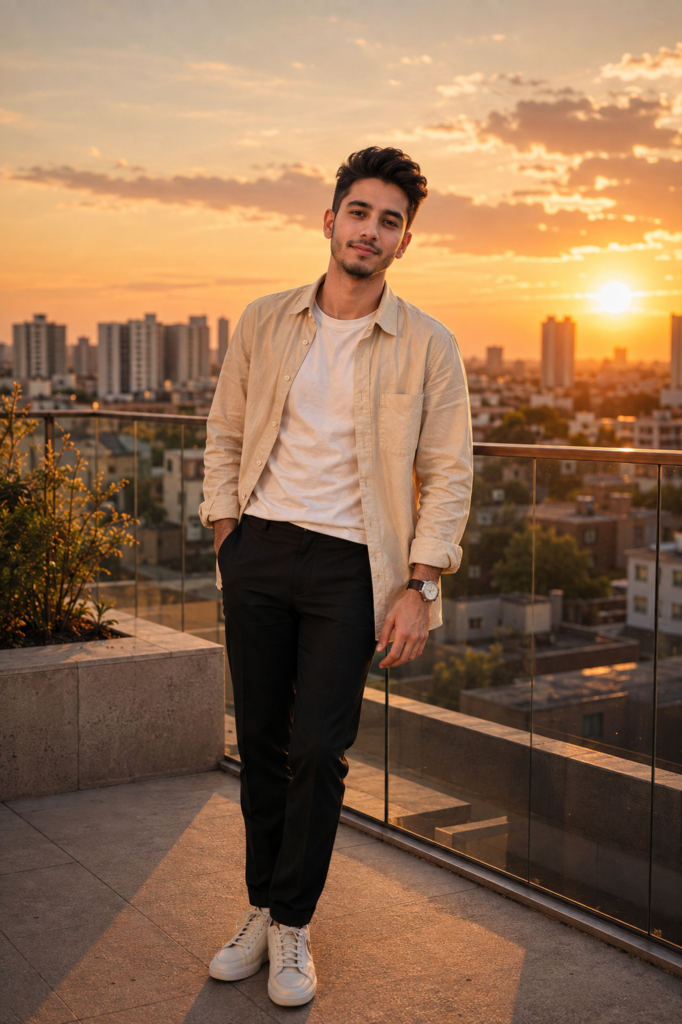
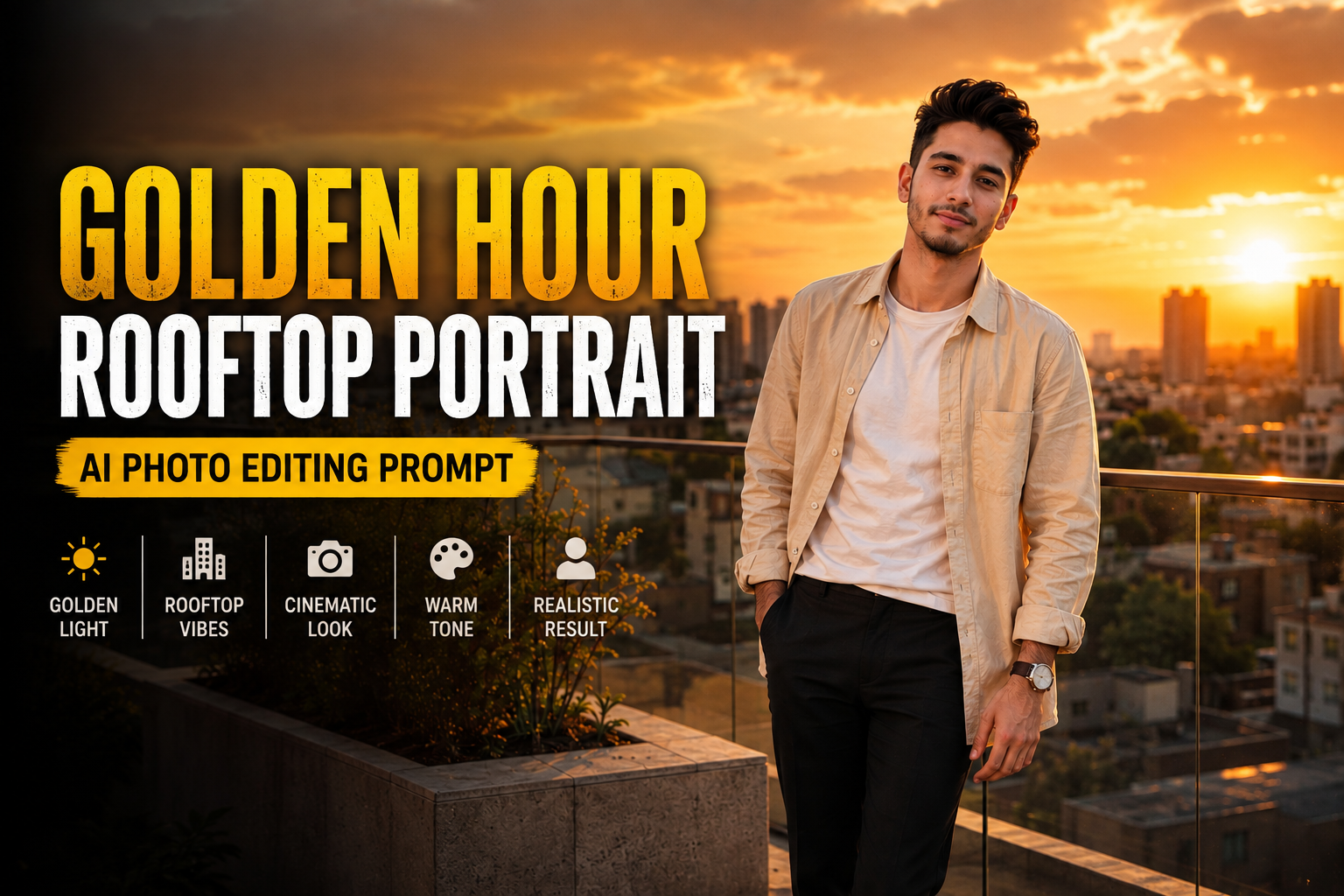
Transform my uploaded photo into a sophisticated golden-hour rooftop portrait while preserving my recognizable face, facial structure, hairstyle, natural skin tone, body proportions, and overall identity.

Place me standing casually on the rooftop of a modern apartment building shortly before sunset. The rooftop should have clean concrete flooring, a minimal glass railing, subtle architectural details, a few tasteful plants, and a wide city skyline visible in the distance.

Create a warm and cinematic late-evening atmosphere. The sun should be positioned low near the horizon behind and slightly to the side of me, creating soft golden rim light around my hair and shoulders.

Dress me in a relaxed cream-colored linen overshirt worn open over a plain white T-shirt, paired with straight-fit dark trousers and clean minimalist sneakers. Add a simple silver watch and keep the accessories understated.

Give me a natural standing pose with one hand resting casually in my trouser pocket and the other relaxed by my side. Keep my shoulders natural and my expression calm and confident. The pose should feel spontaneous rather than like an exaggerated fashion pose.

Use realistic golden-hour sunlight across my face and clothing. Create subtle highlights on the hair, realistic shadows beneath the chin and clothing folds, and a soft warm glow around the edges of the subject.

Show a distant urban skyline with apartment buildings, rooftops, trees, and a few tiny city lights beginning to appear as the sun goes down. Keep the background slightly out of focus so the subject remains the visual focus.

Create realistic atmospheric depth with a subtle warm haze near the horizon and naturally illuminated clouds in the sunset sky. Avoid an overly dramatic or artificial sunset.

Use a professional 50mm portrait photography perspective with shallow but believable depth of field. Keep the face, eyes, hair strands, and clothing texture sharply detailed while allowing distant buildings to fall into a soft cinematic blur.

Preserve natural skin texture, realistic facial details, individual hair strands, authentic fabric folds, accurate hands, believable shadows, and physically consistent lighting.

Use a refined color palette consisting of warm gold, soft cream, muted brown, charcoal, and subtle blue-grey tones in the distant sky. Apply gentle cinematic color grading with natural skin tones, controlled contrast, and softly rolled-off highlights.

The final photograph should look like an authentic high-end lifestyle portrait captured by a professional photographer during real golden hour, not an AI-generated image.

Do not change my identity or facial characteristics. Avoid excessive skin smoothing, beauty filters, exaggerated muscles, unrealistic facial changes, or artificial-looking details.
Negative Prompt
If your AI image editor supports negative prompts, use:
distorted face, changed identity, different person, unrealistic skin, plastic skin, excessive skin smoothing, beauty filter, unnatural eyes, deformed hands, extra fingers, missing fingers, duplicated limbs, unnatural body proportions, warped clothing, floating accessories, distorted buildings, unrealistic skyline, fake sunset, oversaturated orange sky, excessive HDR, unrealistic shadows, artificial rim light, cartoon style, anime style, blurry face, low resolution, excessive sharpening, fake skin texture, bad perspective, messy composition, duplicate person
How to Create a Realistic Golden Hour Portrait
1. Use Natural Sunset Lighting
The most important part of a golden-hour portrait is the direction of light. Asking the AI to place the sun low near the horizon helps create believable highlights and shadows.
2. Avoid Excessive Orange Effects
A common problem with AI sunset photos is an overly orange appearance. Keep the skin tone natural and use warm colors mainly in the background and highlights.
3. Keep the Rooftop Minimal
A clean rooftop allows the subject and sunset to remain the focus. Too many objects can make the composition look cluttered.
4. Add Subtle Rim Light
Low sunlight naturally creates a bright outline around hair and shoulders. A subtle rim light can make the portrait look more professional without appearing artificial.
5. Maintain Natural Skin Texture
Don’t ask the AI to completely smooth the skin. Realistic pores, tiny imperfections, and natural facial texture can make the final image much more convincing.
Golden Hour Rooftop Prompt for a Casual Outfit
For a more relaxed Instagram aesthetic, replace the outfit section with:
Dress me in a relaxed oversized beige sweatshirt, straight-fit faded blue jeans, clean white sneakers, and a simple wristwatch. Keep the outfit casual, contemporary, and naturally styled for a sunset rooftop photograph.
Luxury Rooftop Variation
For a premium fashion look, try:
Dress me in a tailored charcoal blazer over a black crew-neck shirt, fitted trousers, polished minimal sneakers, and a classic silver watch. Keep the styling elegant, modern, and understated.
Sunset Silhouette Variation
For a more dramatic composition:
Position me slightly in front of the setting sun with the skyline behind me. Create a subtle backlit silhouette while retaining enough warm fill light on my face and clothing to preserve recognizable facial details.
Tips for Better AI Golden Hour Photos
For the best results, use a clear original portrait where your face and hairstyle are visible. AI tools can preserve your appearance more effectively when the source image contains enough facial detail.
You can experiment with different rooftop environments such as:
- Modern apartment rooftops
- Hotel terraces
- City skyline viewpoints
- Minimalist rooftop cafés
- Urban parking rooftops
- Luxury building terraces
- Sunset balcony scenes
You can also change the color palette from warm gold to peach, muted orange, soft pink, or a combination of warm sunlight and cool blue shadows.
Why Golden Hour Photos Look Premium
Golden-hour photography is popular because sunlight becomes softer and warmer near sunset. This can create gentle highlights, longer shadows, and natural separation between the subject and background.
When combined with a rooftop skyline, minimalist styling, and realistic depth of field, the result can resemble a professional lifestyle or fashion photoshoot.
AI editing makes it possible to recreate this atmosphere from an ordinary portrait while experimenting with different outfits, locations, and compositions.
Final Thoughts
A Golden Hour Rooftop Portrait AI Photo Editing Prompt can turn a simple portrait into a warm, cinematic sunset photograph. The prompt focuses on realistic lighting, natural skin texture, stylish clothing, believable surroundings, and professional photography details.
For the most convincing result, keep the sunset subtle, maintain your natural facial features, and avoid excessive filters. Small details such as realistic shadows, hair highlights, fabric texture, and atmospheric depth can make a major difference in the final image.